
Description
EventAdmin is a simple yet powerful plugin for managing volunteers at events.
Designed for clubs, street festivals, and similar events — organizers create shifts, assign participants, or let volunteers sign up themselves.
Features:
- Create shifts with time period, category, and min./max. volunteers
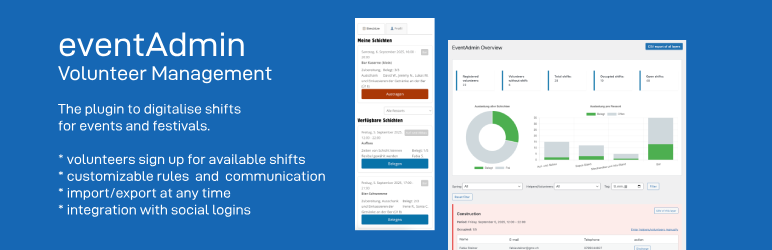
- Public frontend: volunteers register, sign up for shifts, and manage their profile in one place
- Volunteers can sign up and cancel themselves (with optional cancellation deadline)
- Optional “Full shifts” section so volunteers can still see fully booked shifts (disabled by default)
- Automatic checks: e.g. max. 2 shifts/year & no time overlaps
- Manual creation and assignment of volunteers by admins — assign existing volunteers from a dropdown or create new accounts on the fly, including offline volunteers without an email address
- Per-shift organizer user, name, and email — override the global notification sender per shift with a linked WordPress user plus optional manual overrides
- Automatic reminder emails X days before a shift starts
- CSV export per shift or for all shifts
- Admin overview with filters (upcoming/past/all, category, volunteer, date) and sorting
- Dashboard statistics: registered volunteers, upcoming shifts, empty shifts, understaffed shifts, filled/open spots
- Bulk email tool: send custom announcements to all or opted-in volunteers — processed in batches, with a real-time progress bar, delivery failure tracking, and a confirmation email to the sender
- Volunteers can opt out of announcements via their profile page
- Send history log with subject, message preview, recipient count, and failure count
- Integration with Nextend Social Login
License
This plugin is free software under the GPLv2 or later.
Installation
- Install the plugin via the WordPress backend or upload the ZIP file
- Activate the plugin
- Go to Pages Add New and insert the
[eventadmin]shortcode — this is the main volunteer page (shows registration for new visitors, and the shift selector + profile for logged-in volunteers) - Create shift categories under Shifts Categories
- Create your first shifts under Shifts Add New
- Optional: create separate pages for
[eventadmin_profile]or[eventadmin_shiftselector]if you want dedicated pages for those features
FAQ
-
Do volunteers need an account?
-
Yes, volunteers must be logged in to view and join shifts.
-
How can I assign volunteers manually?
-
In the admin dashboard under “Volunteer Overview” for each shift via form.
-
What happens when shifts are full?
-
By default, full shifts are hidden on the volunteer page. You can optionally enable a “Full shifts” section under Settings so volunteers can still see them (read-only, with a disabled button).
-
What is the minimum volunteers field for?
-
You can set a minimum number of volunteers per shift. The admin dashboard will highlight understaffed shifts with a warning. Enforcement (e.g. blocking the shift from appearing) is not yet applied – this is informational only.
Reviews


Contributors & Developers
“EventAdmin – Volunteer Management” is open source software. The following people have contributed to this plugin.
Contributors
“EventAdmin – Volunteer Management” has been translated into 5 locales. Thank you to the translators for their contributions.
Translate “EventAdmin – Volunteer Management” into your language.
Interested in development?
Browse the code, check out the SVN repository, or subscribe to the development log by RSS.
Changelog
Version 1.4.0
- New: Reminder emails for assigned Volunteers X days before a shift starts, configurable under Settings Communication
- New: Settings cleanup — single Settings menu entry with General, Display, and Communication tabs
- New: Organizer user link on shifts — use a linked staff-side WordPress user as the email sender fallback, while keeping organizer name/email as manual overrides
- Improvement: Frontend shift buttons now switch with translated labels instead of hardcoded English text
- Improvement: Transactional emails use a shared HTML wrapper for a more professional appearance
- Improvement: Documentation now explains email template customization inline in the admin area
- Fix: German locale updates for new settings, reminders, organizer-user flow, and communication UI
Version 1.3.0
- Fix: Confirmation emails now use the date/time format configured in Settings Display instead of a hardcoded format
- Fix: Email live preview in settings now reflects the configured date format in real time (AJAX-powered, locale-aware)
- New: “Create new volunteer” form on the Volunteers page — create online or offline volunteers directly without going via a shift
- New: Configurable volunteer shift filters — admin can enable a text search and/or date picker on the shift selector (Settings Display)
Version 1.2.0
- New: Shift card layout — date/time and category labels now in a stable flex row; multiple or long categories no longer displace the date
- New: Configurable date format for shift start and end time (Settings Display)
- New: Custom CSS field in settings — integrators can store theme-specific overrides directly in the plugin without editing theme files
- Improvement: Date format fields show a live preview and a collapsible token cheat sheet for easier configuration
Version 1.1.0
- New: Send Announcement page — send emails to all volunteers, opted-in volunteers, a specific shift, a specific category, or an individual volunteer
- New: Overridable From name and From email per announcement
- New: HTML formatting support in announcement emails with live preview (subject, body, sender)
- New: Send history log — collapsible table with filter and sortable columns; shows subject, recipients, sent/failed counts, and full message body
- New: Volunteers page — filter by category, text search, and sortable columns
- New: “Email” button on volunteer rows links directly to Send Announcement with that volunteer pre-selected
- New: Offline volunteers (no email address) are clearly indicated in the Volunteers list
- New: Chart labels on the Overview page are now fully translated
- New: Send Announcement section added to the Documentation page
- Fix: Settings and Documentation menu items now always appear last in the Shifts submenu
Version 1.0.1
- Fix: Settings and Documentation menu items now always appear last in the Shifts submenu
- Improvement: Removed duplicate bulk email form from Volunteers page — use Send Announcement for bulk emails; offline volunteers (no email address) are visually indicated in the table
Version 1.0.0
- Fix: Social badge now correctly detects Nextend Social Login users via the wp_social_users table instead of wrong meta key
Version 0.9.9
- Fix: Manually added volunteers (via admin form or role grant) are now protected from auto-deletion and shown with a green Manual badge
- New: Unverified volunteer accounts (registered but magic link never clicked) are auto-deleted daily after the link expires; deletion log visible on the Volunteers page
- New: Unverified, Social Login, and Manual badges shown per volunteer in the admin Volunteers list
- Fix: Admin users who also hold the volunteer role no longer lose access to the WordPress backend (explicit false caps removed from volunteer role definition)
Version 0.9.7
- New: Admins can grant or remove the volunteer role from existing WordPress users directly on the Volunteers page — includes an upcoming-shift warning before removal
- Fix: Category filter dropdown no longer overlaps shift cards on themes with non-standard heading sizes (replaced fragile negative margin with a flex layout)
Version 0.9.5
- Fix: Bundled translations now always take priority over language packs from translate.wordpress.org, preventing incomplete community translations from overriding the plugin’s own strings
Version 0.9.4
- New: Assign existing volunteers directly from a dropdown when adding manually to a shift
- New: Offline volunteers — add volunteers without an email address; a placeholder is created silently, no notifications sent
- New: Per-shift organizer name and email — overrides the global notification address for both admin and volunteer emails on that shift
- Fix: Duplicate assignment no longer possible when the same email is submitted twice (pre-check added)
Version 0.9.3
- Fix: New strings from 0.9.2 (update notice, support section, plugin row links) now fully translated in all 8 bundled languages
Version 0.9.2
- New: Donation and review links added to the plugin row in the Plugins list
- New: “Support EventAdmin” section added to the Documentation page
- New: Dismissible update notice shown to admins after plugin updates
Version 0.9.1
- New: Translations added for German (de_DE, de_AT), Dutch (nl_NL, nl_NL_formal), French (fr_FR, fr_BE), and German Switzerland formal (de_CH)
- Fix: Several translation errors corrected in de_CH and de_DE_formal
Version 0.9.0
- New: Admin overview defaults to upcoming shifts — add “Show: Upcoming / Past / All” filter to see past or all shifts
- New: Admin overview sortable by date or name, ascending or descending
- New: Admin overview stats now include empty shifts and understaffed shifts
- New: Bulk email tool — send custom announcements to all or opted-in volunteers, with real-time progress bar, batch processing (25 per request), failed delivery tracking, and a confirmation email to the sender
- New: Email send history log on the announcement page (subject, message preview, recipients, failures, sent by)
- New: Volunteers can opt out of announcements via their profile page (opted-in by default, existing users unaffected)
Version 0.8.0
- Fix: Quick edit fields (start time, end time, max. volunteers) now pre-populate correctly when opening the quick edit row
- Fix: “Period” column in the shift list is now sortable by start date/time
- New: Optional “Full shifts” section on the volunteer shift selector page (disabled by default, enable under Settings)
- New: Minimum volunteers field on shifts – admin dashboard shows an understaffed warning when the minimum has not been reached
Version 0.7.2
- Bugfix release
Version 0.7.1
- Tested up to WP 6.9
Version 0.7
- restrict access to shifts and departments for non-logged in users (and SEO)
Version 0.6
- missing .pot file added to support translations
Version 0.5
- Review Feedback 2.0
Version 0.4
- i18n – Support Multilanguage
Version 0.3
- Extension of admin interface
Version 0.2
- Notification extensions
0.1
- Initial release
- Shift management, volunteer registration, dashboard, export, rules