Description
Mirrago – AI Virtual Try-On for WooCommerce
Let Your Customers Try Before They Buy — Right on Your Product Page.
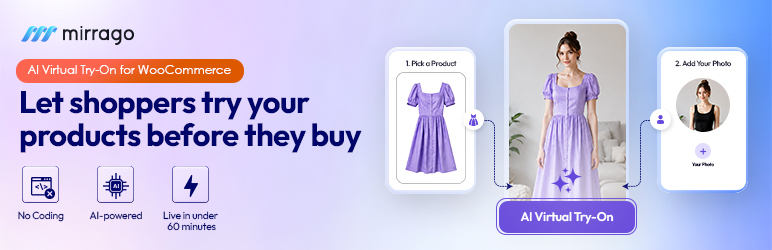
Mirrago is the AI-powered virtual try-on plugin built natively for WooCommerce. Your shoppers upload a photo, select a product, and see exactly how it looks on their body in under 20 seconds. No guesswork. Fewer return rates. No developers needed.
Install from your WordPress dashboard. Go live in under 30 minutes. Start converting browsers into buyers from day one.
Mirrago | Business | WordPress Try-on | Pricing | Book a Free Demo
The New Way to Sell Fashion on WordPress
eCommerce on WordPress has evolved — and so have shopper expectations. Customers don’t just want product photos anymore. They want to see themselves in what they’re buying.
Mirrago brings enterprise-grade AI try-on for fashion to any WooCommerce store, regardless of size or tech stack. Whether you sell everyday apparel, luxury fashion, eyewear, or accessories. Mirrago renders your products onto real bodies with photorealistic accuracy at the exact moment a purchase decision is being made.
The result? Fewer abandoned carts. Fewer returns. Conversion lift.
What Makes Mirrago Different?
Most virtual try-on tools overlay a flat product image on a generic model. Mirrago doesn’t.
Mirrago’s AI virtual try-on technology renders clothing onto the shopper’s actual uploaded photo—preserving their real proportions, posture, and skin tone. Fabric texture, natural drape, and sheen are all simulated at high fidelity. The result looks like the shopper physically tried the item on because, to the AI, they did.
This isn’t a gimmick. It’s a measurable conversion tool.
- Up to 35% fewer returns: Shoppers buy with real visual confidence
- Up to 47% higher conversion rate: Try-on customers commit faster
- 65% more product page engagement: Interactive experience keeps shoppers on-site longer
- 30-minute setup: From install to live try-on, no developer required
Plugin Features
Real-Body AI Rendering
Your shoppers aren’t mannequins — and now your product pages don’t treat them like one. Mirrago renders outfits directly onto the shopper’s uploaded photo, matching their body shape, posture, and proportions with precision.
Photorealistic Fabric Simulation
Fabric doesn’t just sit flat. Mirrago simulates how cloth actually drapes, folds, and falls—capturing texture, weave, and sheen the way it would look in a fitting room mirror.
Full Outfit Composition
Let shoppers build complete looks — top, bottom, outerwear, and accessories — all on one photo. A powerful built-in cross-sell engine that increases average order value without a single extra plugin.
Cross-Category Support
Apparel. Eyewear. Footwear. Jewelry. Watches. Accessories. If it goes on the body, Mirrago’s AI can render it under one store setup.
Results in Under 20 Seconds
Each try-on render completes in under 20 seconds. Fast enough for real-time shopping decisions. Built for scale, not queues.
Privacy-First, GDPR-Compliant
Shopper photos are processed securely and auto-deleted after every session. Never stored. Never used for AI training. Fully GDPR compliant — zero data risk for your store.
Built-In Conversion Analytics
See exactly how virtual try-on is affecting your sales. Track try-on events, conversion lifts, and engagement — all from your WordPress dashboard. No third-party analytics setup is required.
Who Is Mirrago For?
- Fashion & Apparel Stores — Sell shirts, dresses, pants, and outerwear with confidence. Let shoppers see the natural drape and how it looks on their own body.
- Eyewear & Accessories Brands — Precision face and head alignment lets shoppers virtually try glasses, bags, watches, and jewelry in real time.
- Sportswear & Activewear — Silhouette-matching renders compression and stretch fabric accurately. Seamless layering previews for full kit looks.
- Luxury & Designer Labels — Ultra-high-definition texture rendering with AI shadow and lighting adjustments for maximum realism.
- Workwear & Uniform Suppliers — B2B portal-ready with dynamic brand logo and name placement previews for corporate procurement.
Setup in 4 Simple Steps
01 — Install the Plugin
Download and activate Mirrago directly from your WordPress plugin directory. One click. No files to upload manually.
02 — Configure Your Settings
Enter your API key and customize the try-on widget appearance to match your store. Takes under 5 minutes.
03 — Assign Products
Choose which products get virtual try-on enabled. Works at the individual product or category level.
04 — Go Live
The try-on button appears on your product page automatically. That’s it — start converting.
Platform Compatibility
- WordPress: 6.2+
- WooCommerce: 6.0+
- Elementor: Compatible
- Divi: Compatible
- WPBakery: Compatible
- All Mobile Devices: Fully Responsive
Simple, Transparent Pricing
No forced upgrades. No hidden fees. Scale when you’re ready. See Pricing and choose according to your business need.
Yearly plans available: pay for 10 months, get 12 months of access. Every plan includes onboarding support, integration guidance, and the ability to upgrade at any time.
1 image generation = 1 try-on result. Credits renew monthly. Unused credits reset at the end of the cycle.
Trusted by 100+ brands worldwide. Featured in the NVIDIA Inception Program.
Install Mirrago Book a Free Demo Talk to a Specialist
External Services
This plugin connects to the Mirrago cloud API (api.mirrago.com) to generate virtual try-on images. The shopper’s uploaded photo and the selected product image are sent to Mirrago’s servers for processing and are automatically deleted within 24 hours. See the Mirrago Privacy Policy and Terms of Service for details.
Screenshots


Installation
- Upload the Mirrago plugin to /wp-content/plugins/ or install directly from the WordPress plugin directory
- Activate via the Plugins menu in WordPress
- Open Mirrago Settings in your dashboard
- Enter your API key—get one free at Mirrago
- Assign try-on to products and click Go Live
FAQ
-
How exactly does the virtual try-on work?
-
It works by creating a digital wireframe for the human body in real-time. We use advanced computer vision models, specifically HumanParse and DensePose, to identify and segment the user’s body parts. The system then calculates the exact position and posture to map the clothing correctly.
-
Is it AI, AR, or 3D technology?
-
It is fundamentally driven by artificial intelligence. While it delivers an Augmented Reality (AR) experience to the user, the core engine uses AI to map 2D images dynamically, meaning we do not need to rely on expensive, fully rigged 3D models for every piece of clothing.
-
Does the customer need to change clothes physically?
-
No. Because our AI accurately segments the user’s body, it can simply digitally drape the new clothing over whatever they are currently wearing.
-
Can it recognize different body shapes, heights, and skin tones?
-
Yes. The DensePose and segmentation techniques are designed to map human topology universally, easily adapting to any unique body shape, height, or size. The final rendering adjustments ensure it looks natural against varying skin tones.
-
How realistic is the final virtual outfit?
-
Extremely realistic. We utilize specialized techniques like TPD to rigorously preserve the original textures, fine details, and patterns of the fabric, so they do not stretch or warp unnaturally. As a final step, the system automatically corrects the lighting and enhances the picture, so the digital garment blends perfectly into the real-world environment.
-
How long does it take to generate the virtual outfit?
-
The generation pipeline is highly optimized. For 90% of users, the complete virtual outfit is generated in 9 seconds or less (a p90 latency of 9 seconds). In rare cases involving highly complex renders or peak system loads (our p99 metric), it takes a maximum of 20 seconds to complete the AI mapping, texture preservation, and final lighting enhancements.
-
Can images be deleted automatically after each session?
-
Yes. While our standard cloud retention clears data within 24 hours, the API can be configured to delete the image immediately and automatically the moment the user’s session ends.
-
Does Mirrago collect personal information?
-
We do not collect personal information. The Mirrago API only processes the captured image — it does not collect names, phone numbers, or emails. If additional personal information (such as an email to send the user their photo) is needed, that is entirely handled by your front-end application, based on your specific retail requirements.
-
Is customer consent required?
-
Yes. To remain compliant with global privacy laws, the interface must be designed to capture explicit user consent before taking a photo or processing any biometric mapping.
-
Does this plugin require WooCommerce?
-
Yes. Mirrago is built natively for WooCommerce and requires version 6.0 or higher.
-
Do I need a developer to set this up?
-
Not at all. Mirrago is a fully no-code solution. Average setup time is under 30 minutes from your WordPress dashboard.
-
How does the AI try-on work?
-
A shopper uploads a photo on your product page. Mirrago’s AI engine renders the selected product onto their actual body and returns a photorealistic result in under 20 seconds.
-
Are shopper photos saved or stored?
-
No. All photos are processed securely and will be deleted after 24 hours. Photos are never stored, never shared, and never used for AI training. Mirrago is fully GDPR compliant.
-
What counts as one image generation credit?
-
One credit equals one try-on result image. Credits renew each month, and unused credits reset at the end of each billing cycle.
-
Which product categories are supported?
-
Apparel, eyewear, footwear, jewelry, watches, and accessories—any wearable product category.
-
Will Mirrago slow down my store?
-
No. Try-on processing runs on Mirrago’s own cloud infrastructure, not on your server. Your site speed is unaffected.
-
Is there a free option to test before purchasing?
-
Yes. Free tier is available. Get started at Mirrago
Reviews


Contributors & Developers
“Mirrago Virtual Tryon” is open source software. The following people have contributed to this plugin.
Contributors
Translate “Mirrago Virtual Tryon” into your language.
Interested in development?
Browse the code, check out the SVN repository, or subscribe to the development log by RSS.
Changelog
1.5.0
- Marketing-consent checkbox is now unchecked by default
- Removed IP address and user-agent logging
- “Powered by Mirrago” attribution is now opt-in and disabled by default
- Security hardening: input sanitization, nonce verification, output escaping
- Moved inline scripts and styles to properly enqueued assets
- Documentation of the Mirrago external service
1.4.0
- Added email capture, analytics, per-product toggle, and CSV export
1.0.0
- Initial release