
Description
LinkRevive AI checks every link on your site in the background and tells you, in plain words, which ones are really broken and how to fix them. It is free, with no account, no limits and no upsell inside the plugin’s features.
No false alarms
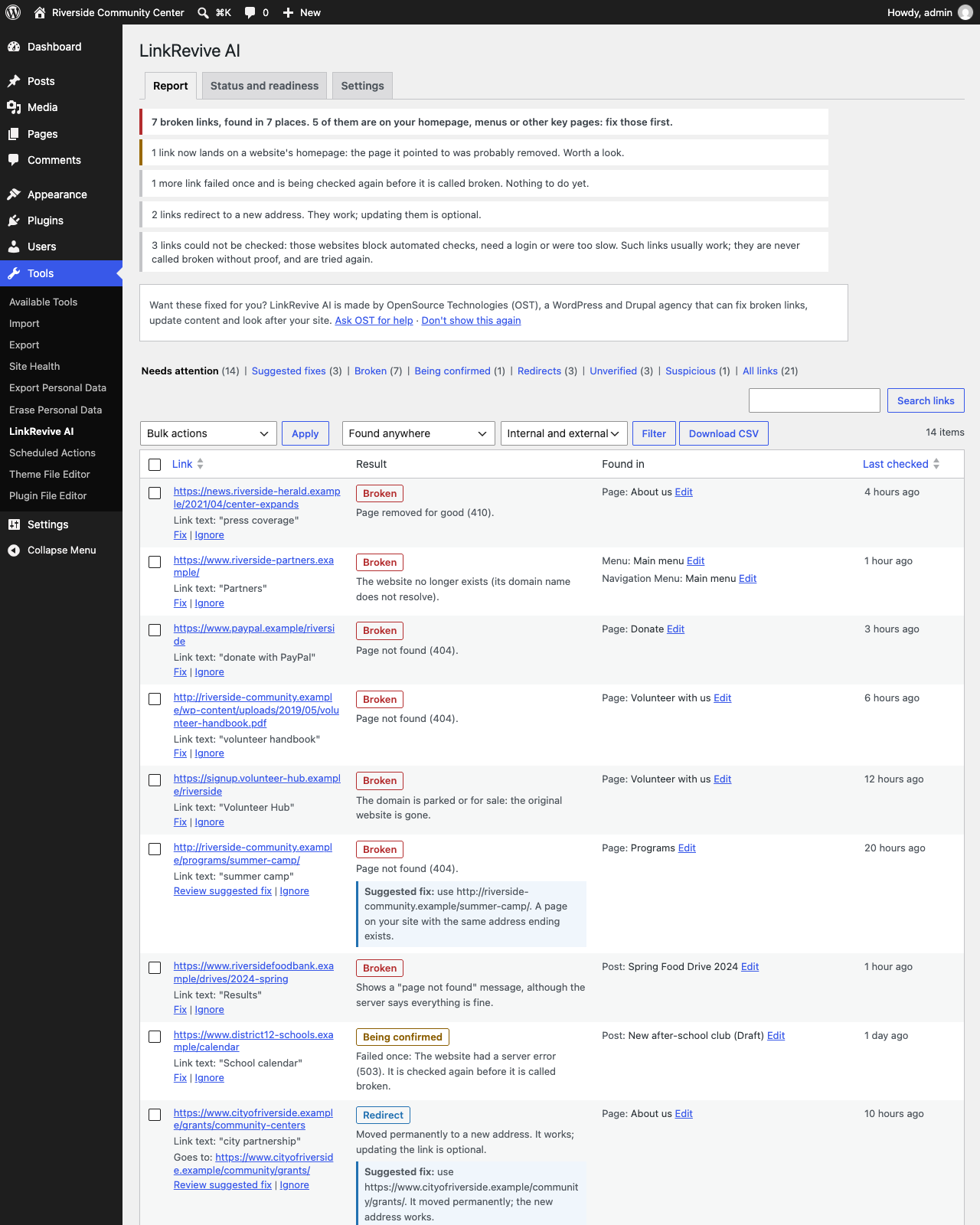
Many link checkers call a link “broken” because one website blocked an automated visit or was slow for a minute. LinkRevive AI only calls a link Broken after it fails again on a later check. Websites that block automated checks (bot protection, logins, rate limits) are shown as Unverified — never as broken without proof. It also catches “page not found” pages that pretend to work (soft 404s).
Finds links everywhere
- Posts, pages and custom post types in every status: published, scheduled, private, drafts and pending
- Classic editor and blocks, including links kept in block settings (navigation, embeds, social links)
- Menus, widgets, block-theme templates, template parts and navigation menus
- Advanced Custom Fields (URL, link, rich text, repeaters and groups) and Elementor pages
- Links, images, embeds and files
Fix in one click, safely
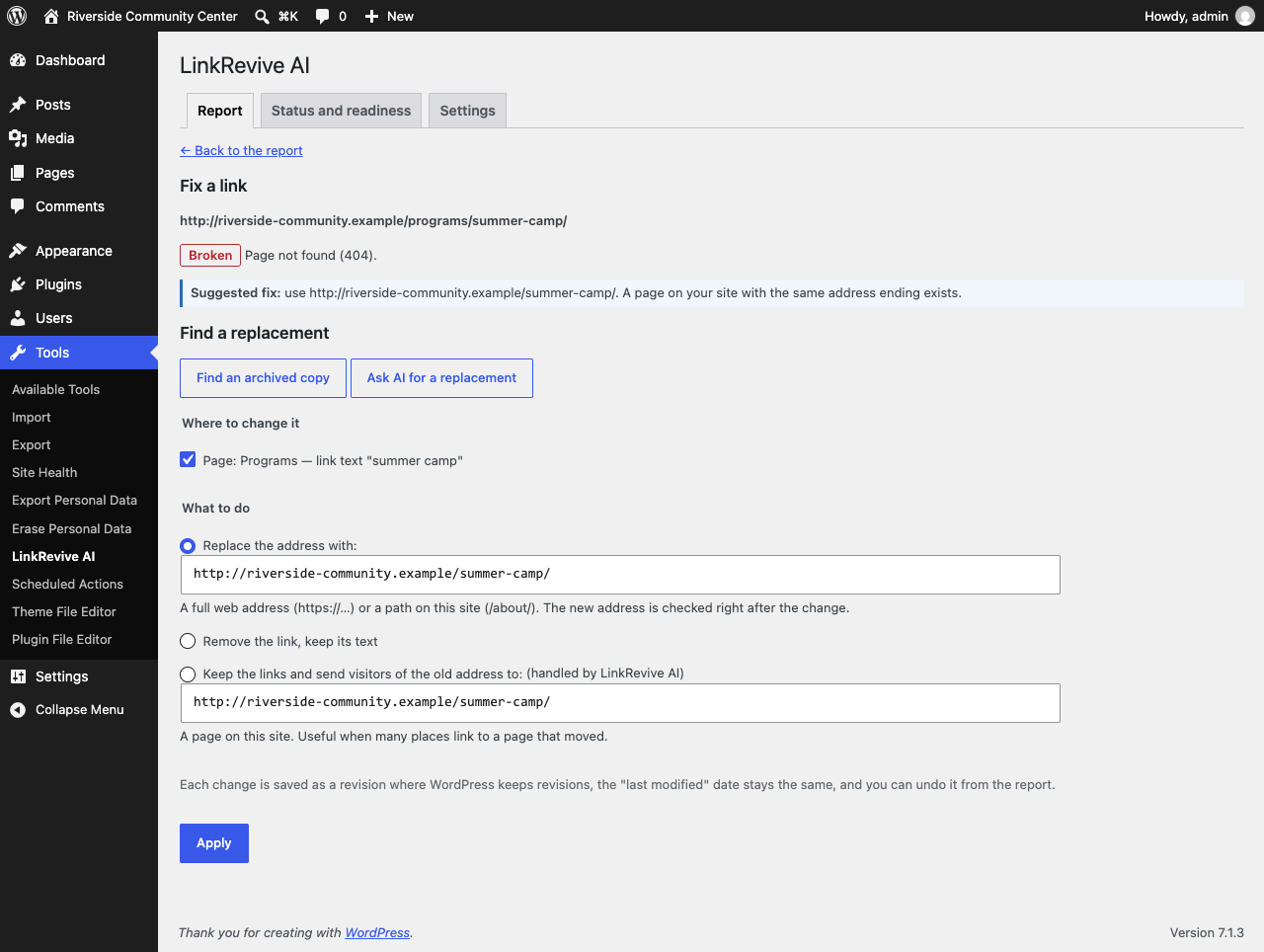
- Replace an address, or remove a link and keep its text — in one place or everywhere it appears
- Suggested fixes: links that moved permanently are updated to their confirmed new address; broken links to your own pages are matched to where the page moved
- Redirect a removed page of your site to a new one instead of editing every link (works with the Redirection plugin)
- Bulk fixing with a preview, and one-click undo for every change
- Every change is checked before it is kept: if anything but that one link would change, nothing is changed
- Saved as a revision, the “last modified” date stays the same, caches are cleared (WP Rocket, LiteSpeed, W3 Total Cache, WP Super Cache, Cloudflare and more)
Optional helpers (off until you switch them on)
- Wayback Machine: find an archived copy of a page that is gone
- AI suggestions through WordPress’s built-in AI connection (WordPress 7.0+, with the AI provider you set up under Settings Connectors): suggests a replacement; every suggested address is checked before you see it
Never slows your site
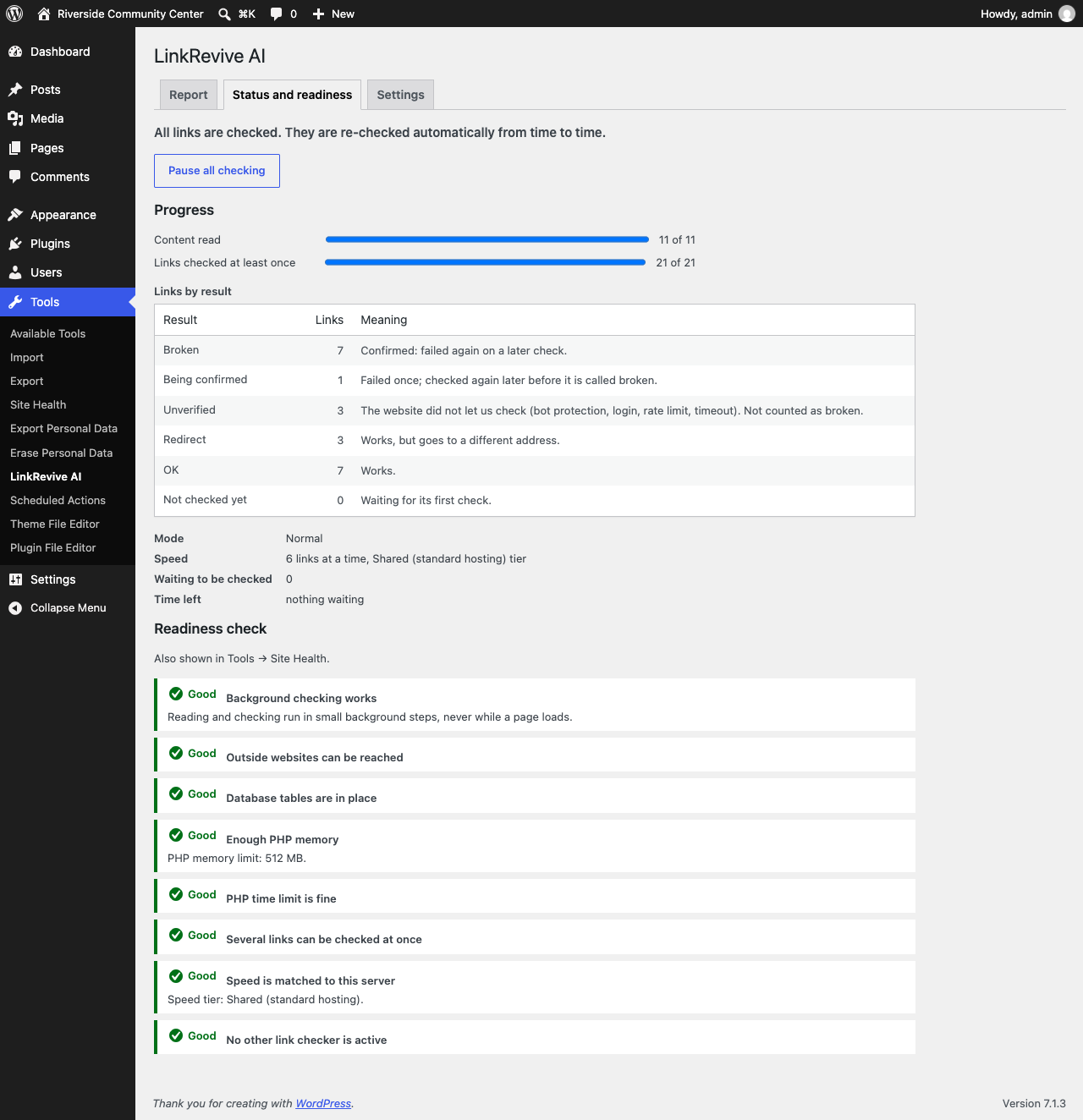
Checking runs in small background steps, never while a page loads. The plugin measures your server and adjusts its speed, slows down at once when your site gets busy, recovers by itself if something goes wrong, and can be paused at any time. On hosts that limit link checkers it switches to a gentler host-friendly mode with a daily limit.
Reports
- A plain-English summary: what to fix first, what can wait and why
- Filters, search and CSV export
- An optional weekly email
- A readiness check in Tools Site Health
LinkRevive AI is made by OpenSource Technologies (OST), a WordPress and Drupal agency.
External services
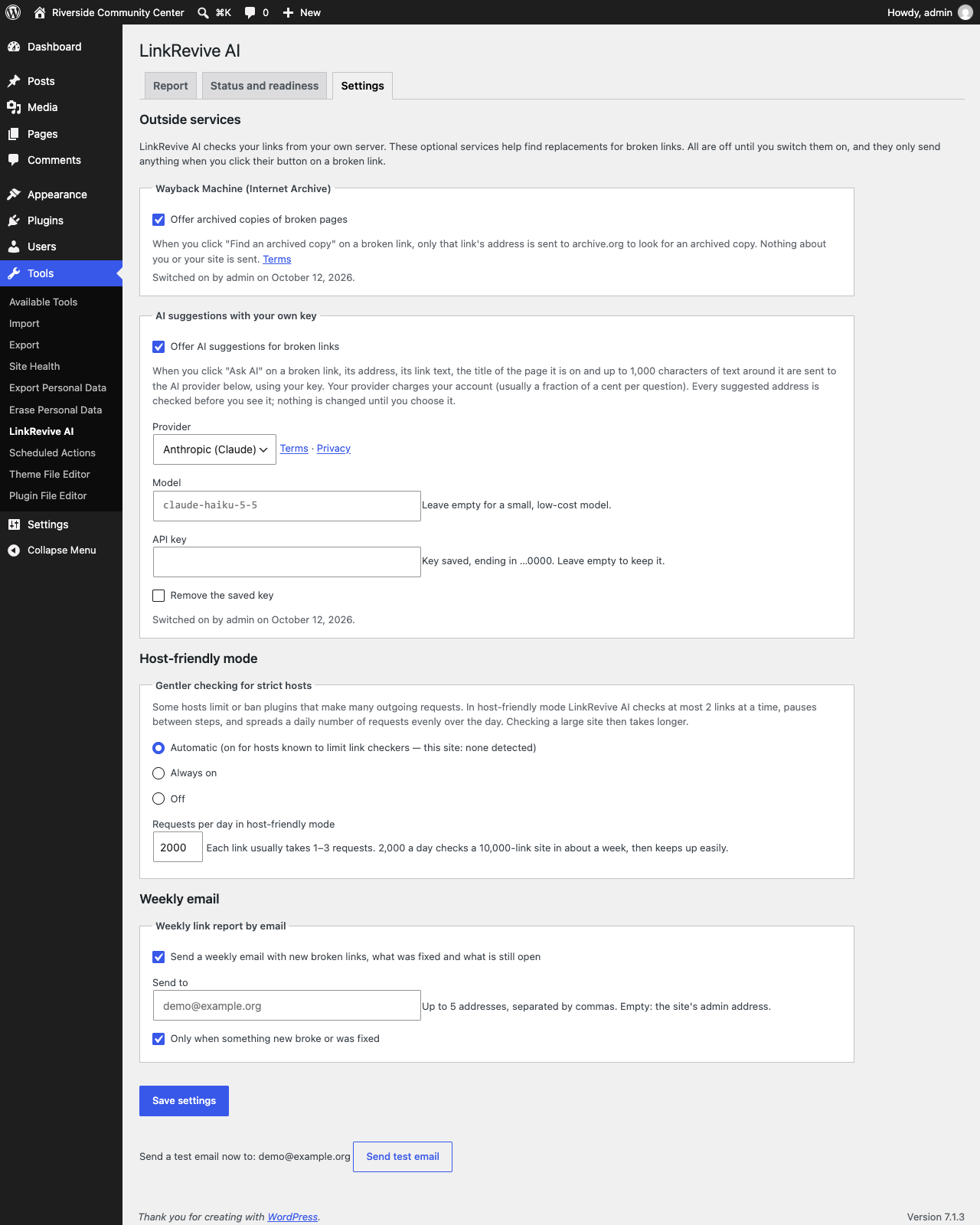
LinkRevive AI talks to outside services only as described here. Optional services are off until an administrator switches them on (Tools LinkRevive AI Settings), and then only send anything when an administrator clicks their button on a broken link. No visitor data is ever sent.
The websites your links point to
To check a link, the plugin requests that link’s address from your own server, as any visitor’s browser would (with an honest User-Agent: “LinkRevive-AI/1.0; +https://wordpress.org/plugins/linkrevive-ai/”). Only the address itself is requested; nothing about your site or visitors is sent. This is the plugin’s core purpose. It starts only after an administrator clicks “Start checking links” (Tools LinkRevive AI), or runs wp linkrevive start; until then the plugin only reads your own content and contacts no other website. After that it runs in the background and can be paused at any time.
Internet Archive — Wayback Machine (optional, off by default)
Used to find an archived copy of a broken page. When an administrator clicks “Find an archived copy”, only that broken link’s address is sent to https://archive.org/wayback/available, without the part after “?” (only plain page numbers such as ?p=12 or ?lang=en are kept).
Terms of use: https://archive.org/about/terms.php — Privacy: https://archive.org/about/terms.php
AI suggestions through WordPress’s AI Client (optional, off by default)
Used to suggest a replacement for a broken link. The plugin does not contact any AI service itself and stores no AI keys: it uses WordPress’s built-in AI Client (WordPress 7.0 or later), which sends the question to the AI provider the site owner has set up under Settings Connectors. When an administrator clicks “Ask AI”, the broken link’s address (without the part after “?”, except plain page numbers such as ?p=12), its link text, the title of the page it is on and up to 1,000 characters of the surrounding text are sent to that provider. The terms, privacy policy and charges of the provider the site owner chose apply. Every suggested address is checked by the plugin before it is shown; nothing on the site changes until the administrator chooses a suggestion and applies it.
Screenshots

Installation
- Install and activate the plugin from Plugins Add New.
- Go to Tools LinkRevive AI. The plugin has started reading the links in your content (this stays on your server). Click “Start checking links” to let it check them; nothing is sent to any other website before you do.
- Links are then checked in the background. Progress and results appear on the same page.
- Optional: switch on the weekly email, the Wayback Machine or AI suggestions under Tools LinkRevive AI Settings.
From the command line: wp linkrevive start, wp linkrevive status, wp linkrevive check, wp linkrevive pause / resume.
FAQ
-
Is it really free?
-
Yes. No account, no link limits, no paid tier. The plugin is made by OpenSource Technologies (OST), an agency; if you’d like help fixing your site, you can ask OST — that’s the only “offer”, shown once on the report and in the optional weekly email, and you can hide it.
-
What does “Unverified” mean?
-
The website didn’t let us check (it blocks automated checks, needs a login, asked us to slow down, or was too slow). Such links usually work for visitors. They are tried again later and are never called broken without proof. A link that has not answered at all for two weeks is listed separately (“No answer for 2+ weeks”) so you can open it yourself.
-
Will it change my content without asking?
-
No. Nothing on your site changes until you choose a fix and click Apply. Every change can be undone for 30 days (the plugin keeps a copy of the changed text for that long, then deletes it).
Fixes are saved directly, without opening the editor. If someone has the same page open in the editor at that moment and saves it afterwards, their save brings the old link back; the plugin notices on its next check and shows the link again.
-
Does it work on multisite?
-
Yes. Each site has its own links, settings and report.
-
My host limits link checkers (e.g. GoDaddy Managed WordPress, Pressable). Can I use it?
-
Yes. On these hosts LinkRevive AI automatically uses host-friendly mode: at most 2 links at a time and a daily number of requests spread over the day. You can change this under Settings.
-
Why does the plugin use curl directly instead of the WordPress HTTP API?
-
Link checking runs in our standalone PHP library (
ost/linkrevive-core, bundled invendor/), which is also used by our Drupal module. It uses PHP’s curl extension directly for three reasons the WordPress HTTP API cannot cover:- Safety (SSRF protection). Links come from site content, so a link could point at your own server’s private network or a cloud metadata address. We resolve every address, refuse private and reserved ones, and then pin the connection to the address we checked, on every redirect step, so DNS cannot be switched in between.
- Stopping early. We only need the first 16 KB of a page and the status of a file. The library stops a download as soon as it has that; the WordPress HTTP API’s size limit keeps downloading and discards the rest.
- Speed without load spikes. A rolling queue starts the next link the moment one finishes, at most 2 requests per outside website. On real links this measured about 4 times faster than parallel batches through the WordPress HTTP API, so scans finish sooner and use the server for less time.
If you prefer, the plugin uses the WordPress HTTP API instead (same results, slower). Add
define( 'LINKREVIVE_HTTP_ENGINE', 'wordpress' );towp-config.phpor use thelinkrevive_http_enginefilter. Both need PHP’s curl extension, because the checked server’s address is pinned through a curl option; without curl, no links are checked and the plugin’s readiness list says so. -
Will it slow down my site?
-
It is built not to. All work runs in short background steps (never while a page loads). The plugin measures your server once a week (memory, time limit, a short speed test, how fast your site answers) and picks a speed tier. It then speeds up slowly and slows down at once when it sees warning signs: high CPU use, memory pressure, slow database writes, many timeouts, or your site answering slower than usual. On budget hosting it runs at its starting speed during the day.
If a background step ever crashes, the next one runs in Safe mode (one link at a time). A link that crashes a step on its own is set aside for 30 days and shown as “Unverified”, never “Broken”. After repeated crashes the plugin pauses itself and says why.
-
How do I stop it completely?
-
Use the pause button, run
wp linkrevive pause, or adddefine( 'LINKREVIVE_PAUSED', true );towp-config.php. Nothing runs while paused. Edits made meanwhile are picked up when you resume. -
Can my host or developer lower the limits?
-
Yes, with the
linkrevive_slice_planfilter (e.g. fewer parallel requests or shorter steps).wp linkrevive statusshows the tier, level and current speed.
Reviews
ഈ പ്ലഗിന് റിവ്യൂകൾ ഒന്നുമില്ല.
Contributors & Developers
“LinkRevive AI – Broken Link Checker & Fixer” is open source software. The following people have contributed to this plugin.
Contributors
Translate “LinkRevive AI – Broken Link Checker & Fixer” into your language.
Interested in development?
Browse the code, check out the SVN repository, or subscribe to the development log by RSS.
Changelog
1.0.3
- Changed: link checking starts only after an administrator clicks “Start checking links”. Activating the plugin only reads your own content and contacts no other website.
- Changed: the plugin’s styles and scripts load only on its own screen.
1.0.2
- Changed: AI suggestions now use WordPress’s built-in AI Client (WordPress 7.0+) and the AI provider you set up under Settings Connectors. The plugin no longer calls AI services itself or stores AI keys.
1.0.1
- Fixed: removing a link could leave a stray “>” behind on WordPress 6.5–6.x.
- Fixed: a user name or password written inside a link’s address is never sent to the Wayback Machine or the AI provider.
- Fixed: on a multisite network, sites added later now get their first scan.
- Fixed: the undo history is cleared after 30 days even when no new fixes are made.
- Fixed: without PHP’s curl extension, links are no longer checked at all (and the readiness list says so) instead of failing.
- Fixed: the report’s filters and CSV button are visible on phones.
- Fixed: the two buttons on the settings page have their own names.
1.0.0
- First release.