
Description
Coywolf SEO is built on a simple idea: an SEO plugin should give you exactly what you need, and nothing more. No upsells, no nags, no bloat, no features you have to turn off — just the essentials, done right, with the plugin doing the heavy lifting in the background.
Features:
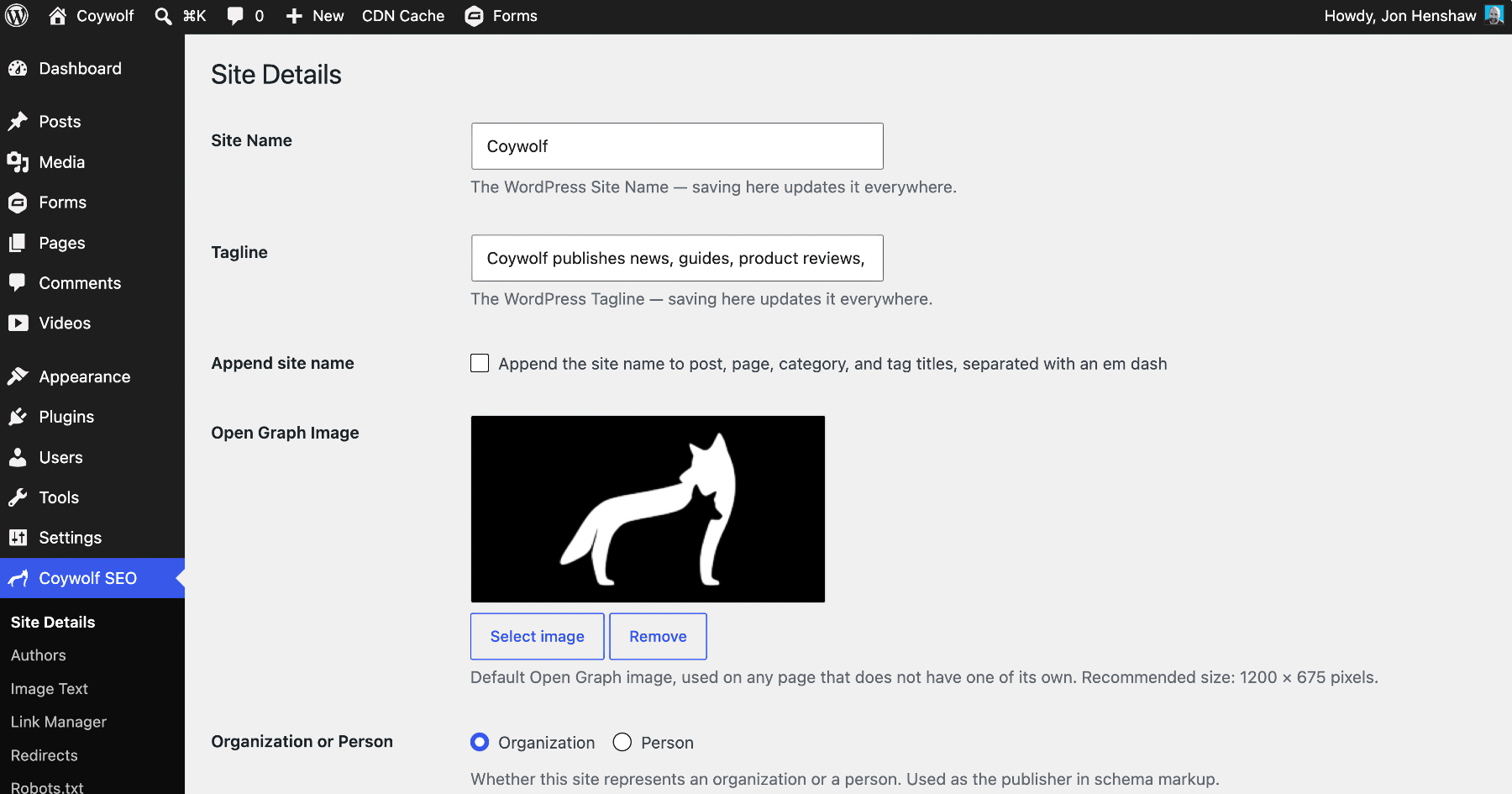
- Site Details — one screen for your site’s identity: name and tagline, whether titles append the site name, the default Open Graph image, whether the site is an Organization (with a full Schema.org property picker) or a Person, the homepage title and description, and schema type defaults for posts and pages.
- Titles — clean titles composed from your settings, with the site name appended only where you turn it on. A force-rewrite option handles themes that build their own title markup.
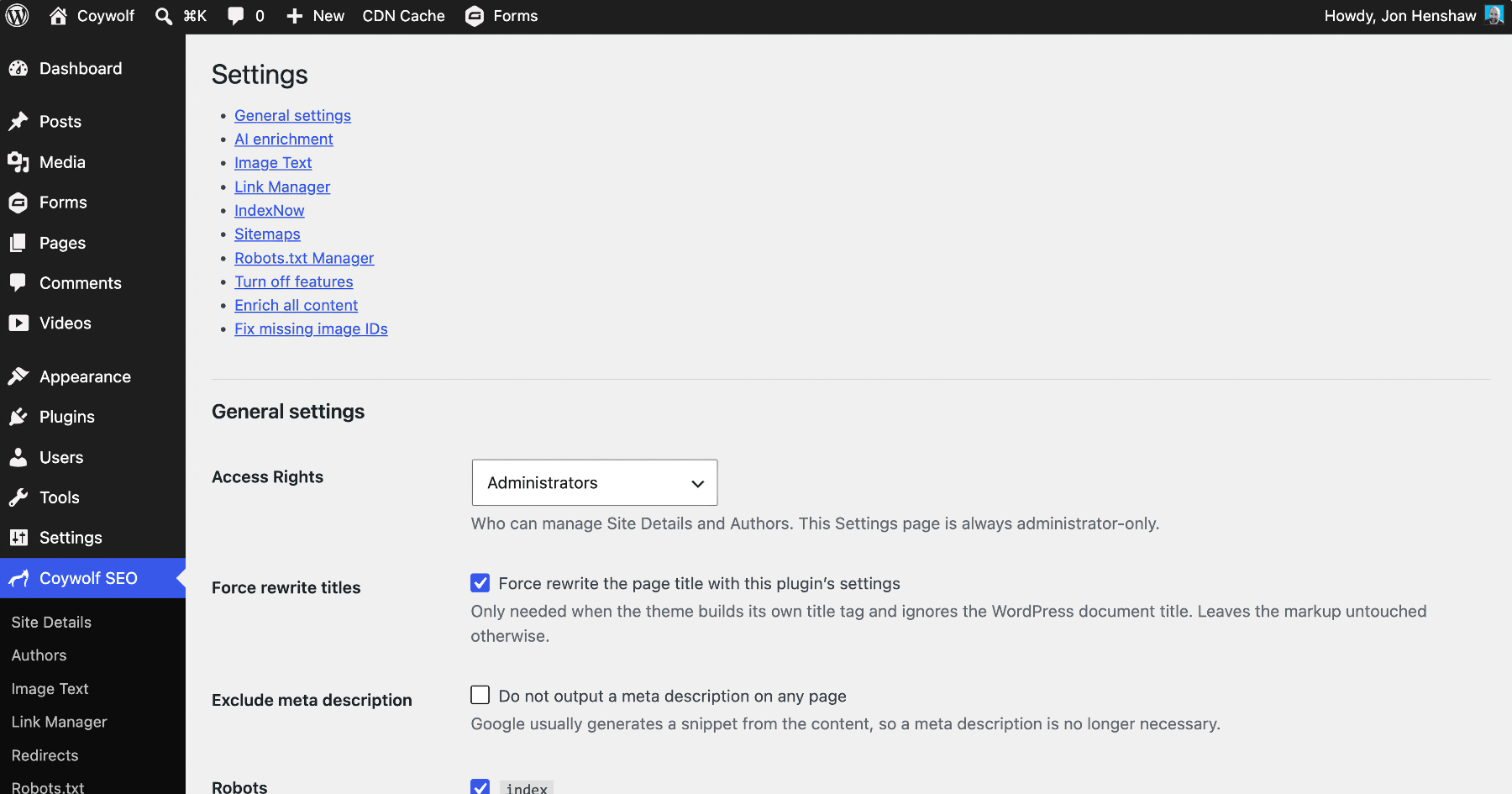
- Meta description — the homepage uses your description (default: the Tagline), posts and pages use their per-post SEO Description or manual excerpt, and terms use their description. A per-post SEO Description also becomes the excerpt when there is none, so excerpt, meta description, and Open Graph description stay in step. One checkbox turns meta descriptions off entirely.
- Robots meta — index, follow, and the max-preview directives on by default, each toggleable, with per-post Noindex and Nofollow.
- Canonical links — on the homepage, posts, pages, and category and tag archives, with pagination handled and a per-post override.
- SEO section on posts and pages — a panel in the block editor (and a classic meta box) to override the schema page/article type, set Noindex/Nofollow, or replace the canonical link.
- Duplicate Post — a Duplicate link by each post and page title copies it to a new draft — content, taxonomies, featured image, custom fields, and your SEO settings — with a fresh slug and date, so the copy never competes with the original.
- Table of Contents block — a dynamic table built when the page is served, so it never goes stale: automatic heading anchors, a per-heading exclude toggle, selectable levels (H2–H6), plain, bulleted, or numbered styles, collapsible, smooth scrolling, current-section highlighting, and a scroll offset for sticky headers. A Yoast table-of-contents block converts in one click, and after you switch from Yoast a banner offers to replace every Yoast table of contents at once through a Preview/Replace modal that carries each one’s title, heading level, level range, and list style across.
- Heading anchors — every content heading gets a stable “jump-” prefixed id so any heading can be linked to directly; your own HTML anchors are kept. One checkbox, on by default.
- Mobile alternative image — the core Image block gains a mobile-specific image served below 768px through a real picture-element media query (art direction, not srcset guesswork). The breakpoint is filterable.
- Schema markup — one JSON-LD graph per page: WebSite, your Organization or Person as the publisher, the typed WebPage and Article with its author, and CollectionPage on category and tag archives.
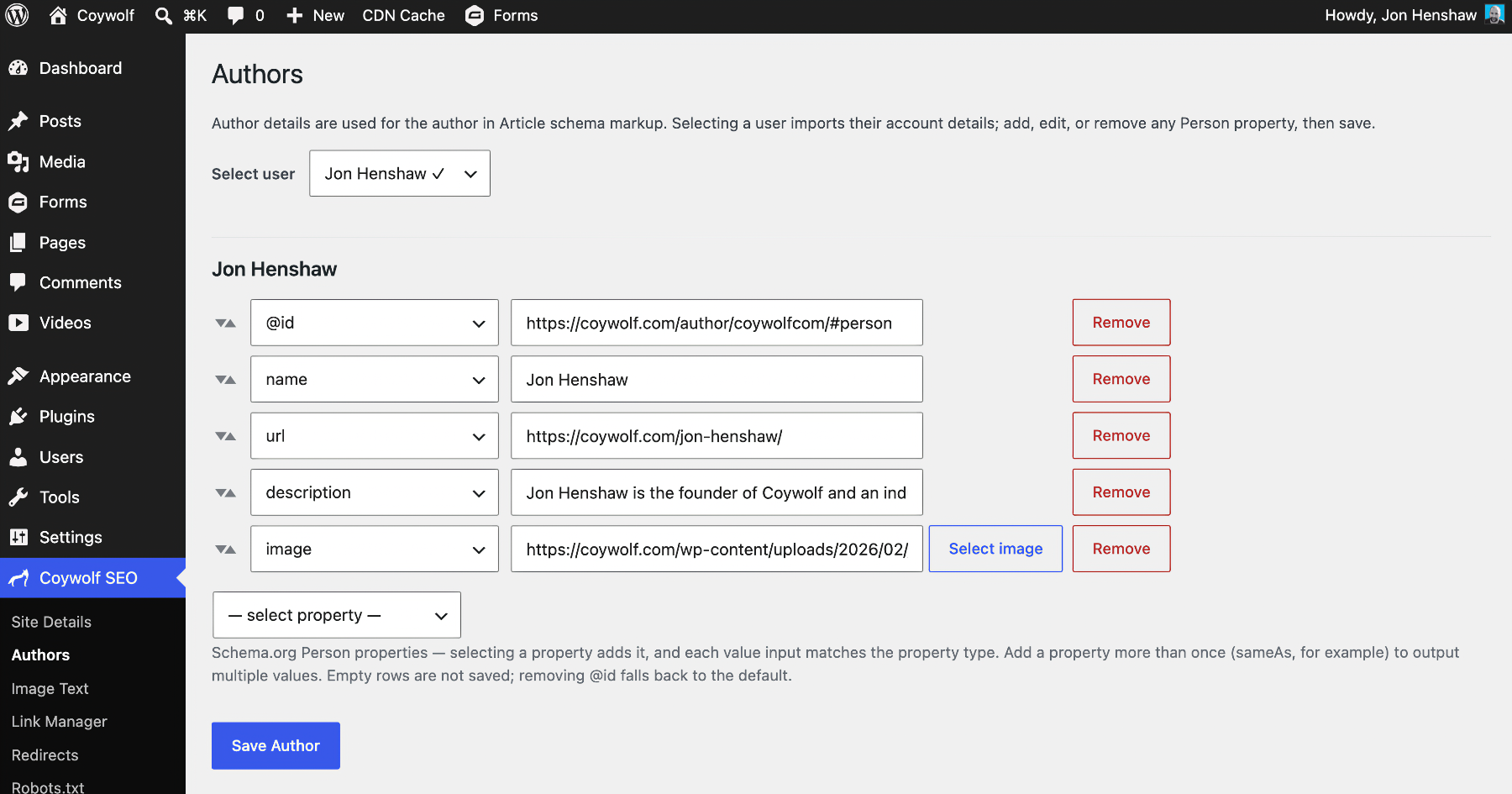
- Authors — import a user’s details as Schema.org Person properties, add anything from the full Person catalog, and use it as the author in Article markup.
- Open Graph — og: tags on the homepage, posts, pages, and term archives, with the featured image falling back to your default. No Twitter/X tags — X reads Open Graph.
- Access rights — choose whether Editors can manage the plugin alongside Administrators.
- Takes over from other SEO plugins — with Yoast SEO, Rank Math, All in One SEO, SEOPress, or The SEO Framework active, their front-end output and edit-screen boxes are suppressed through each plugin’s own switches, so nothing is duplicated while you migrate. Their sitemaps and redirects keep running.
- Hide the category prefix — serve category archives at /news/ instead of /category/news/, with 301 redirects from the old URLs.
- IndexNow — ping Bing the moment a post or page is published, updated, or deleted. The site key is generated for you and served virtually.
- Native sitemap exclusions — drop the Posts, Pages, Categories, or Users sitemaps from WordPress’s own sitemap; everything else stays as WordPress generates it.
- News sitemap — optionally serve a news sitemap of articles from the last 48 hours, with per-post-type and per-category control.
- LLMs.txt and Markdown source endpoints (off by default) — make your site agent-readable: a spec-conformant /llms.txt index of your public content and a Markdown source for every page at …/index.html.md, with content negotiation and a head alternate link, built entirely from on-site data with no external calls.
- AI enrichment — bring your own API key for Claude (Anthropic), OpenAI, or Google Gemini and it grounds each post’s main subjects to real Wikidata entities in the Article schema’s about, mentions, and sameAs (identifiers are looked up, never invented). Enrich-all runs use the Batch API at roughly half price with live progress and a cost readout, and optional AI meta descriptions write a short summary per post. Uses WordPress 7.0’s bundled AI client and requires WordPress 7.0 or higher.
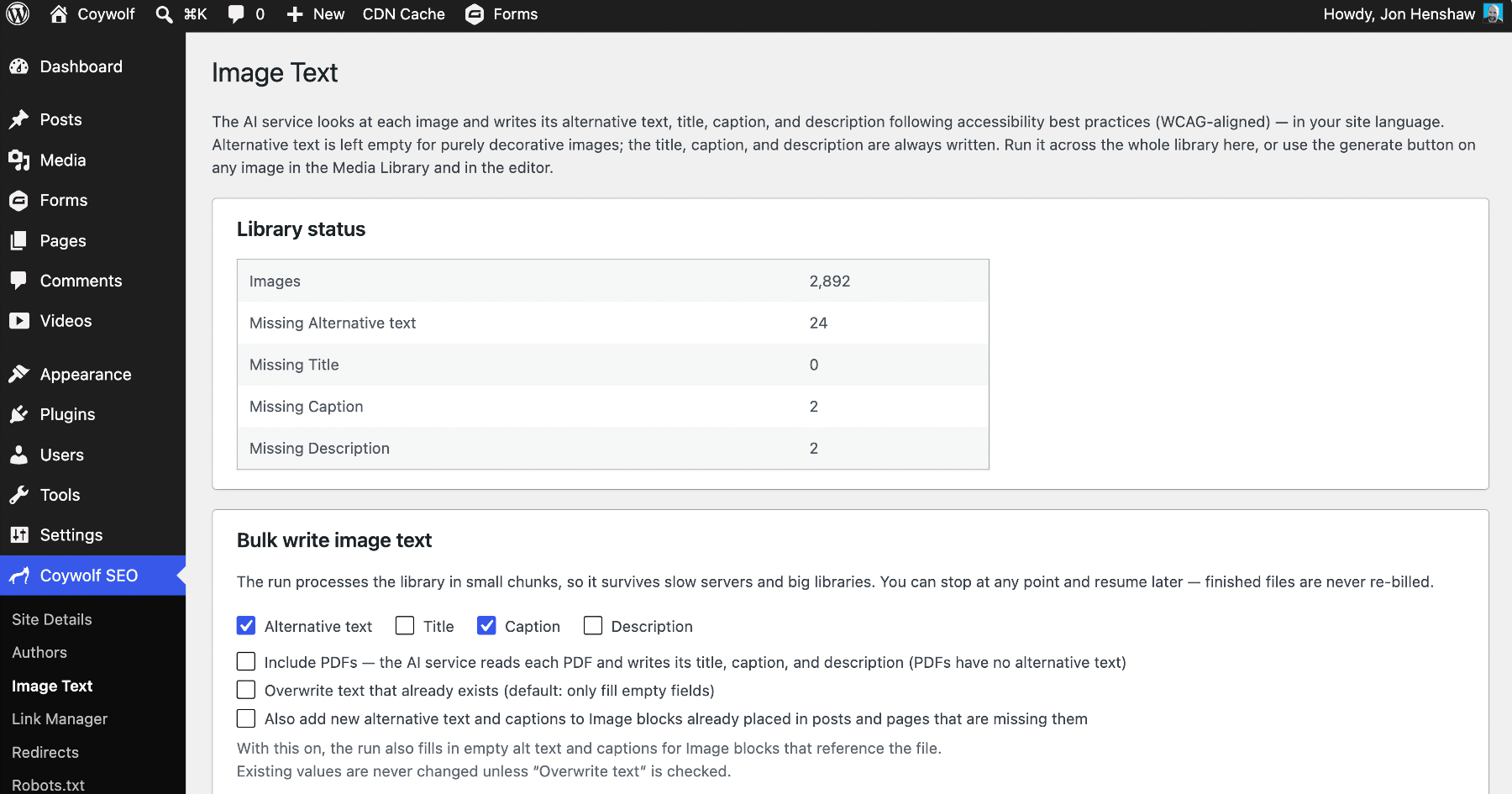
- Image Text — AI-generate alt text, captions, titles, and descriptions for Media Library images, one at a time from the block editor or in bulk in the background. It is WCAG-aware (decorative images get empty alt), new text can propagate into the image blocks already in your content, and a “Fix missing image IDs” tool re-attaches Media Library IDs to images inserted without one.
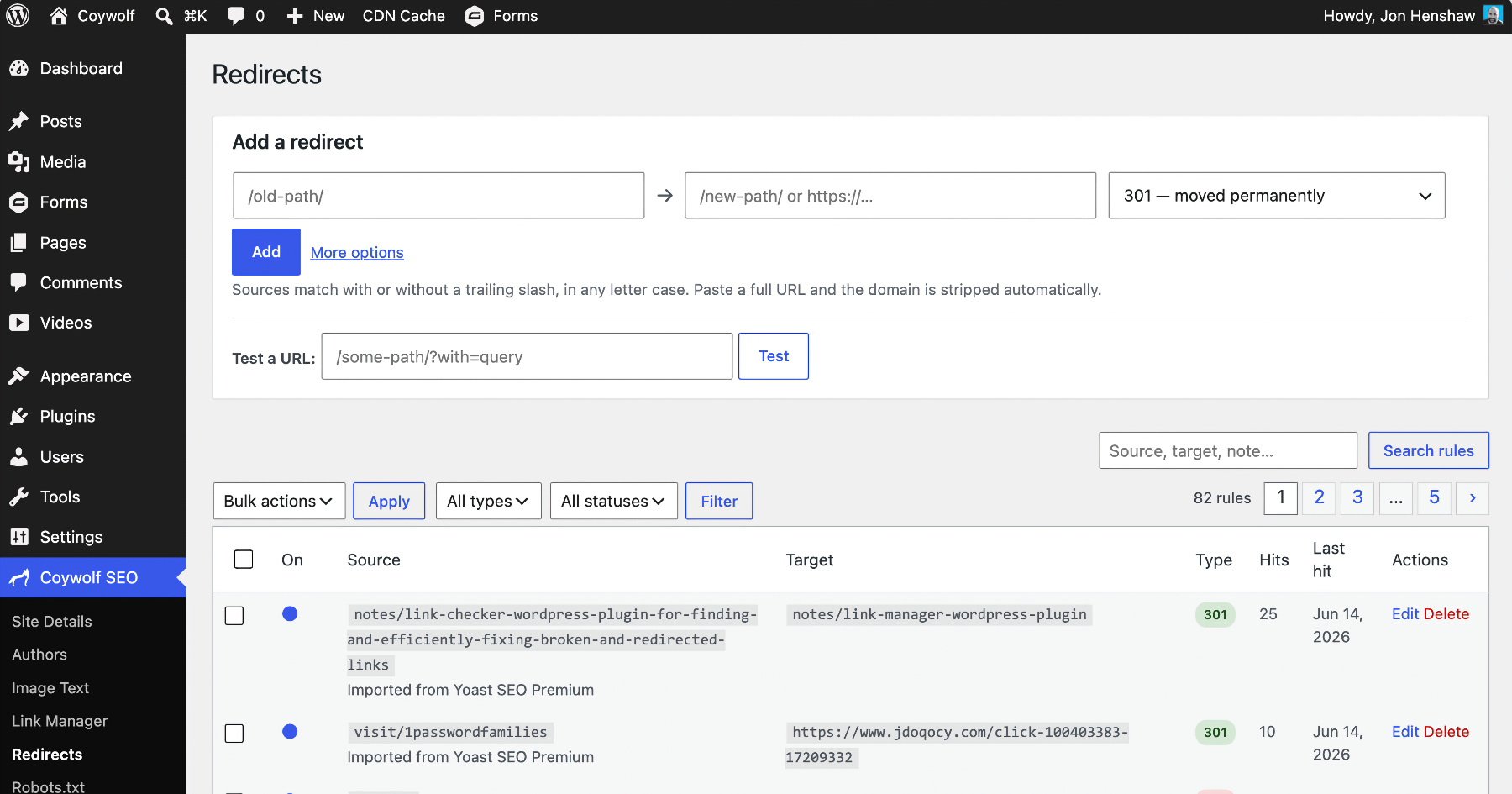
- Redirects — a full redirect manager on one screen: quick-add exact or regex rules (301/302/307/308/410), test any URL before trusting the live site, and watch hit counts. Deleting a post or page prompts you to redirect or 410 its URL right there. When the Redirection plugin is active, Coywolf SEO takes over URL redirects and points you to import its rules.
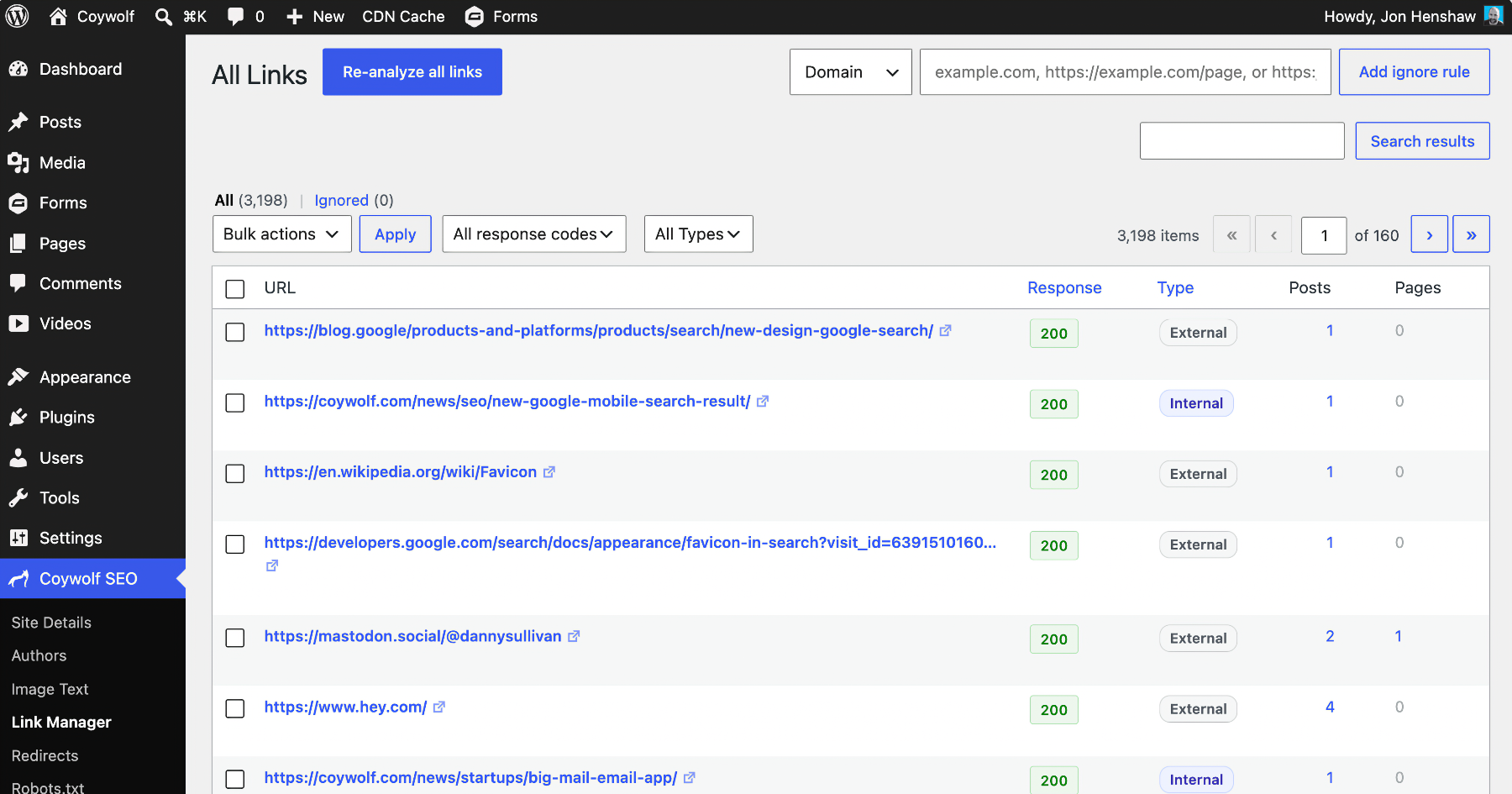
- Link Manager — inventories every link in your posts and pages with its HTTP response, internal or external type, and where it appears, so broken links and redirects are easy to spot and fix in place or in bulk, with ignore rules. The inventory keeps itself current.
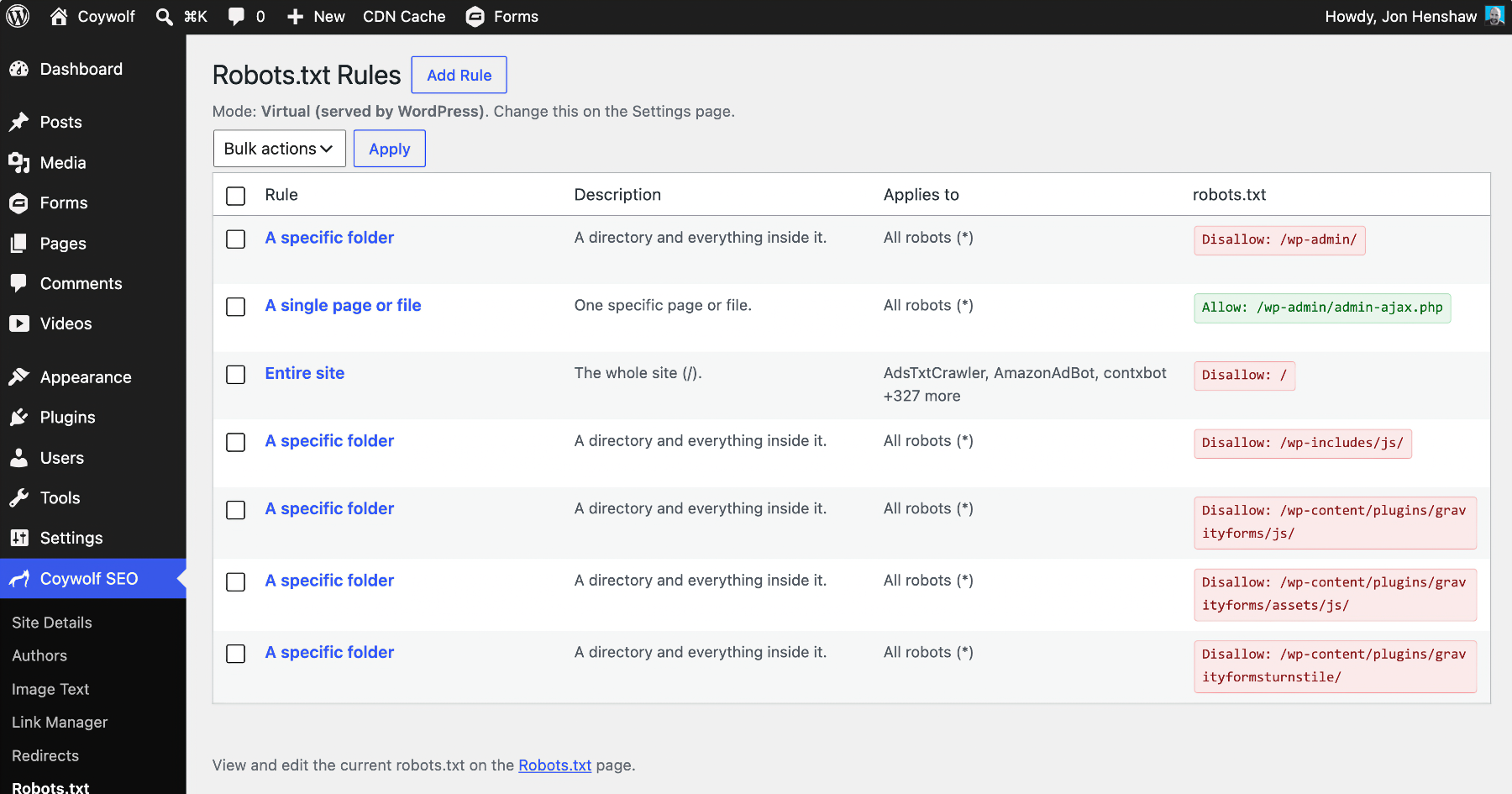
- Robots.txt Manager — manage robots.txt as a table of named, plain-English rules with a guided editor and the bundled Cloudflare Bot Directory, every rule conflict-checked and testable through a PHP port of Google’s open-source Robots.txt matcher (the RFC 9309 reference Googlebot uses). Serve robots.txt virtually or write a real file.
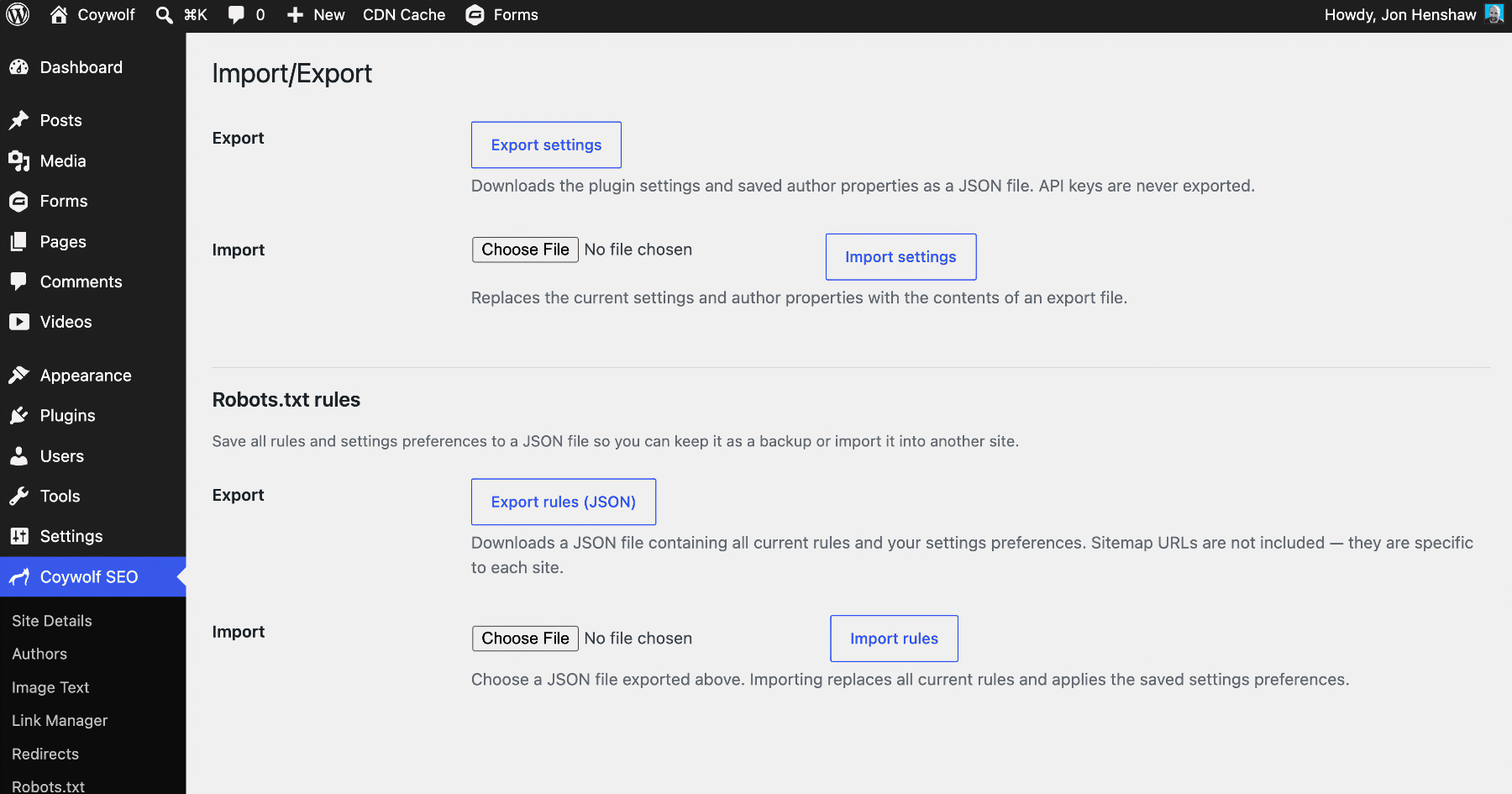
- Import/Export — download the plugin settings, author properties, and redirect rules as JSON and import them on another site. API keys are never exported.
Troubleshooting
- No new tags on the front end? Purge your page and CDN caches (including host-level edge caching) — cached pages keep serving pre-activation HTML. The plugin purges the common cache plugins on activation, but host and CDN caches are outside its reach.
- No Article schema on a page? Pages default to no Article type (Site Details > Pages); set a default there or override per page in the SEO panel.
- No meta description on a post? By default it comes only from a manual excerpt — turn on AI meta descriptions to generate one automatically, or exclude meta descriptions entirely in Settings.
- Nothing at all? The theme must call wp_head() — all output renders there.
Privacy
Privacy-first: this plugin includes no analytics, no tracking, and no data gathering — nothing about you, your site, or your visitors is ever collected. Outbound connections happen only for features you turn on, and each is detailed under “External services” below: with IndexNow enabled, the changed URL is sent to Microsoft Bing’s IndexNow endpoint on publish, update, and delete; with AI enrichment or Image Text enabled, the post title and content — and, for Image Text, the image itself — are sent to the AI service you choose (Anthropic, OpenAI, or Google Gemini) using your own API key, and extracted entity names are looked up on Wikidata’s public API; and with the Link Manager enabled, the plugin requests the URLs you have linked to in your own content to check whether they still work. Nothing else, nowhere else.
External services
This plugin can connect to the third-party services below. Each is optional and is contacted only when you enable the feature that uses it; none are contacted on a default install.
AI provider — Anthropic, OpenAI, or Google Gemini (you choose one)
Used by AI Schema enrichment, AI meta descriptions, and Image Text. When you enable an AI feature and supply your own API key, the plugin sends content to the single service you selected in Settings:
- AI Schema enrichment sends a post or page’s title and text content when it is published or updated (or when you run “Enrich all content”), so the model can extract entity names.
- AI meta descriptions, when enabled, send a post’s content on publish/update to generate a short summary.
- Image Text sends the image (and the surrounding post text for context) when you generate text for an image or run the bulk job.
Requests are authenticated with the API key you provide and are sent only to the one service you select. Terms and privacy policy for each:
- Anthropic (Claude) — Terms: https://www.anthropic.com/legal/commercial-terms — Privacy: https://www.anthropic.com/legal/privacy
- OpenAI — Terms: https://openai.com/policies/terms-of-use/ — Privacy: https://openai.com/policies/privacy-policy/
- Google Gemini API — Terms: https://ai.google.dev/gemini-api/terms — Privacy: https://policies.google.com/privacy
Wikidata (Wikimedia Foundation)
Used by AI Schema enrichment to ground entities to real identifiers. The entity-name strings extracted from your content are sent as lookups to Wikidata’s public API (https://www.wikidata.org/w/api.php); no API key and no personal data are involved. Terms: https://foundation.wikimedia.org/wiki/Policy:Terms_of_Use — Privacy: https://foundation.wikimedia.org/wiki/Policy:Privacy_policy
IndexNow (Microsoft Bing)
Used by the IndexNow feature. When enabled, the URL of a post or page you publish, update, or delete — together with the auto-generated site key — is submitted to Bing’s IndexNow endpoint (https://www.bing.com/indexnow) so search engines can recrawl it promptly. No personal data is sent. About IndexNow: https://www.indexnow.org/ — Microsoft Privacy Statement: https://privacy.microsoft.com/privacystatement
Link checking (the sites you link to)
Not a third-party service, noted here for transparency: when the Link Manager is enabled, it sends HTTP HEAD (and, if needed, GET) requests to the URLs you have linked to in your posts and pages to record each link’s HTTP status. Those requests go to the sites you chose to link to — never to Coywolf or any other service — and carry only an ordinary request with a plugin User-Agent; no information about your site or your visitors is transmitted.
Screenshots
ബ്ലോക്കുകൾ
ഈ പ്ലഗിൻ 1 ബ്ലോക്ക് നൽകുന്നു.
- Table of Contents A table of contents built from the page's headings at view time, so it never goes out of date.
Installation
- Upload the plugin to wp-content/plugins/coywolf-seo or install the zip from Plugins > Add New > Upload Plugin.
- Activate it.
FAQ
-
Does the plugin auto-generate titles and meta descriptions?
-
Titles are composed from your settings, with the site name appended only where you enable it (a force-rewrite option handles themes that build their own title tag). Meta descriptions are never auto-generated — the homepage uses the Tagline, posts and pages use their manual Excerpt, terms use their description — unless you turn on AI meta descriptions or exclude meta descriptions entirely.
-
Why don’t my pages show Article schema?
-
Each page outputs one JSON-LD graph, but pages default to no Article type. Set a default in Site Details Pages, or override it per page in the SEO panel.
-
Which AI service does enrichment use, and what do I need?
-
Bring your own API key for Claude (Anthropic), OpenAI, or Google Gemini and pick one in Settings (or define it in wp-config.php). The AI features require WordPress 7.0+ because they run on its bundled AI client.
-
Can the AI invent entities or make up schema?
-
No. The model only extracts entity names; the real items are looked up on Wikidata’s public API, the model chooses among them, and the chosen item’s type is verified — so identifiers are never fabricated.
-
What does “Enrich all content” cost, and how long does it take?
-
It runs through your service’s Batch API at roughly half the standard token price, in the background, and can take up to an hour. Posts already analyzed with the current settings are skipped, so re-running is inexpensive.
-
If I turn AI enrichment off, do I lose my data?
-
No — detected entities and generated descriptions and image text are kept and still used. Only your saved API key is deleted (re-enter it when you turn AI back on; a key in wp-config.php is ignored while off).
-
Does the bulk “Write image text” run need the page to stay open?
-
No. It processes in the background on WP-Cron, so you can leave and come back to check progress. On a very low-traffic site, leaving the tab open helps it along.
-
What’s the difference between Batch and real-time image text?
-
Bulk image text defaults to the cheaper Batch API (about half price; results within the hour, up to 24 hours). Tick “real-time” for immediate processing at the standard rate. Gemini has no vision Batch API, so it always runs in real time.
-
Why is some image alt text left blank?
-
Alt text is intentionally left empty for purely decorative images (an accessibility best practice). Title, caption, and description are always written.
-
What does “Fix missing image IDs” do?
-
Two things, each only when an uploads-folder image exactly matches a Media Library item: it adds the missing attachment ID to in-content images, and it converts Custom HTML or classic image figures into real image blocks. Run Preview first — it edits post content — and note that converting drops any custom inline figure styling.
-
Why aren’t my in-content images getting the new alt text and captions?
-
Propagation only updates core/image blocks that reference the file, and only empty fields unless “Overwrite” is on. Images added as Custom HTML or by URL aren’t matched until you run “Fix missing image IDs” first.
-
What happens to a deleted post’s URL?
-
The moment you delete a published post or page, the Redirects screen asks what to do with its URL — mark it gone (410), redirect it, or dismiss. Pending decisions also wait on the Redirects page.
-
Can I import redirects from another plugin?
-
Yes — from the Redirection plugin (even when it’s deactivated, read straight from the database) and from Yoast SEO Premium. Duplicates are skipped, so importing is safe to re-run.
-
Does the Link Manager re-scan everything every time?
-
Only the first analysis is a full scan; after that the inventory keeps itself current as you create, edit, and delete posts. A Throughput setting tunes how hard it scans.
-
How accurate is the robots.txt rule tester?
-
It runs on a PHP port of Google’s open-source Robots.txt Parser and Matcher Library — the Robots Exclusion Protocol (RFC 9309) reference implementation Googlebot uses — so the Test URL result, the conflict warnings, and the redundancy checks all reflect exactly how Google will interpret a rule, including * wildcards, $ end-anchors, percent-encoded paths, and Allow-vs-Disallow longest-match precedence. What the plugin previews is what Googlebot will do.
-
What’s the difference between virtual and physical robots.txt?
-
Virtual (the default) means WordPress serves robots.txt with your managed rules injected — no file is written. Physical mode writes a real file and preserves your hand-written lines. On activation, the manager imports and tidies any existing robots.txt.
-
Can I get my original robots.txt back?
-
Yes. Turning the Robots.txt Manager off — or deactivating the plugin — prompts you to restore your original robots.txt or keep the managed rules.
-
Why doesn’t the table of contents go out of date?
-
It’s built when the page is served, not when you save, so headings added later (including by shortcodes and synced patterns) are always included. Each heading has an “Exclude from table of contents” toggle, and a minimum-headings threshold keeps the table off short posts.
-
Do all my headings get anchor links, even without a table of contents?
-
Yes — with the Heading anchors setting on (the default), every content heading gets a jump- prefixed id (for example jump-best-watches) when the page is served, so any heading can be linked to directly. Headings you gave your own HTML anchor keep exactly that anchor, and duplicate headings are de-duplicated. The Table of Contents uses these same anchors, so a table entry and the heading it points at always match.
-
I’m switching from Yoast — can I keep my tables of contents?
-
Yes. After you activate Coywolf SEO, a banner offers to replace every Yoast SEO table of contents across your posts and pages with the Coywolf one; its “Review and replace” button opens a modal with a Preview and Replace tool (Preview first — it edits post content). Each converted table keeps its title, its title’s heading level, the range of heading levels it lists, and its bulleted list style; because the Coywolf table is dynamic, its list is then rebuilt from the live headings and never goes stale.
-
If I write an SEO Description but no excerpt, what happens to the excerpt?
-
The SEO Description is used as the excerpt too. A manual excerpt always wins; if you set an SEO Description but leave the excerpt blank, that description becomes the excerpt as well as the meta and Open Graph description, so all three stay consistent. Only a description you type in yourself does this — the AI-written description never rewrites your excerpts.
-
How is the mobile alternative image different from normal responsive images?
-
It’s true art direction: your phone-specific image is served below 768px through a media query, so it’s guaranteed on small screens rather than left to the browser’s srcset guesswork. The breakpoint is filterable.
-
Does this conflict with Yoast, Rank Math, or AIOSEO?
-
No. While the other plugin is active, Coywolf SEO suppresses its front-end output and edit-screen boxes through that plugin’s own switches, so nothing is duplicated as you migrate — but it leaves their sitemaps and redirects running.
-
No — X reads Open Graph, so only og: tags are output. Categories and tags can also carry their own Page Title and Open Graph image, set right on the term screen.
-
Does Duplicate Post copy my SEO settings?
-
Yes — it copies the content, excerpt, taxonomies, featured image, template, and custom fields, including the SEO meta, into a new draft you own with a fresh slug and date. The original’s old-URL redirect history stays with the original.
-
What happens to my data if I turn a feature off, deactivate, or delete the plugin?
-
Turning a feature off keeps all of its data and just hides it (turning AI off also deletes the saved API key). Deactivating keeps everything and only pauses background jobs. Deleting removes all of the plugin’s data, so back up first — but edits the tools made to your content (added image IDs, converted blocks, image text saved to the Media Library) remain, because those live in WordPress itself.
-
Does Import/Export include my API keys?
-
No. Settings, author properties, and redirect rules export as JSON; API keys are never exported.
Reviews

Contributors & Developers
“Coywolf SEO” is open source software. The following people have contributed to this plugin.
Contributors
Translate “Coywolf SEO” into your language.
Interested in development?
Browse the code, check out the SVN repository, or subscribe to the development log by RSS.
Changelog
1.1.4
- Trim the Description to well under WordPress.org’s 2,500-word limit (#135).
1.1.3
- Hide the Yoast-TOC banner as soon as a replacement clears the last table (#134).
1.1.2
- docs: describe the Yoast TOC replacement as a banner modal (#133).
1.1.1
- Open the Yoast TOC replacement tool in a modal from the banner; remove the Settings section (#132).
1.0.129
- Gate the WordPress.org SVN deploy behind a manual workflow (#130).
1.0.128
- Expand WordPress.org plugin tags for discoverability (#129).
1.0.127
- Remove redundant drag-to-reorder from the schema property repeaters (#128).
1.0.126
- Security and accessibility audit: screen-reader support + security hardening (#127).
1.0.125
- Add per-post Title and Description fields to the SEO panel (#126).
1.0.124
- Cache the regex-redirect rule set (front-end perf) (#125).
1.0.123
- Labs: remove “Block Google from crawling Markdown files” from AI Discovery (#124).
1.0.122
- Labs: unchecking the Markdown-block retracts only Googlebot, keeping other bots (#123).
1.0.121
- Labs: make the AI Discovery Markdown-block idempotent (don’t overwrite a customised rule) (#122).
1.0.120
- Fix broken Robots.txt Manager rule editor (version assets with the live plugin version) (#121).
1.0.119
- Labs: add “Block Google from crawling Markdown files” option to AI Discovery (#120).
1.0.118
- Scope the redirect-import admin notice to plugin screens (WP.org guideline #11) (#119).
1.0.117
- WordPress.org review: prefix JS window globals and the model-cache transient (#118).
1.0.116
- Fix MCP server never registering: defer adapter detection and register the ability category (#117).
1.0.115
- Expose AI Discovery outputs as MCP tools via the WordPress MCP Adapter (#116).
1.0.114
- Add AI Discovery (Labs): group OKF + EntityMap + new ARD ai-catalog.json output, with an OKF .tar.gz download and an enrichment-status panel (#115).
1.0.113
- Add a beaker icon after the Labs submenu label (#114).
1.0.112
- EntityMap (Labs): publish a spec-conformant EntityMap v1.0 file set (entitymap.json + entitymap.html) of your Wikidata-grounded entities, advertised via llms.txt, a link, and a robots.txt allowance (#113).
1.0.111
- llms.txt: bound public cache + purge on rebuild; harden title decode against invalid UTF-8 (#112).
1.0.110
- Fix: decode HTML entities in titles for llms.txt + .md frontmatter (#111).
1.0.109
- llms.txt intro: describe the entity topic index when present (#110).
1.0.108
- Rework llms.txt entities into a topic index of the site’s own articles (#109).
1.0.107
- Fix: /llms.txt + .md endpoints 404 (rewrite flush timing) (#108).
1.0.106
- Hide LLMs.txt sub-options until the feature is enabled (#107).
1.0.105
- Drop the Discovery/Robots.txt group labels from the settings jump list (#106).
1.0.104
- Discovery: llms.txt + per-page Markdown source endpoints (#105).
1.0.103
- Make the OKF Labs panel full-width like the other admin pages (#104).
1.0.102
- OKF Labs: absolute cross-links + a managed robots.txt Allow rule (#103).
1.0.101
- Advertise the OKF bundle (llms.txt, head link, robots allowance) (#102).
1.0.100
- Add Open Knowledge Format (OKF) export as a Labs feature (#101).
1.0.99
- fix(release): ship .wordpress-org/ screenshots in the GitHub build (#100).
1.0.98
- Link Manager: unify 429/999 as Blocked; serve Documentation screenshots reliably (#99).
1.0.97
- Fix Documentation Markdown rendering: comments, italics, FAQ, screenshots (#98).
1.0.96
- Preview chosen images for the image/logo schema fields, and highlight the parent menu item on hidden admin subpages (#97).
1.0.95
- Move action buttons below the white panel on the Edit Link, Add/Edit Rule, and Authors pages (#96).
1.0.94
- Make admin section cards span the full content width (#95).
1.0.93
- Make all admin pages stylistically consistent with white card sections (#94).
1.0.92
- Redirects: offer a 301 when a published post’s URL changes (slug or category) (#93).
1.0.91
- Link Manager: classify anti-bot blocks (999, gated 403/429) as Blocked instead of broken (#92).
1.0.90
- Add a whole-file, agent-aware URL tester to the Robots.txt page (#91).
1.0.89
- Port the full Google RobotsMatcher (whole-file, agent-aware REP evaluation) (#90).
1.0.88
- Fix redundancy false-positive at the longest-match Allow tie (> -> >=) (#89).
1.0.87
- Document the Google REP matcher as a Robots.txt Manager feature (#88).
1.0.86
- Harden the Robots.txt rule checker with Google’s REP matcher (ported to PHP) (#87).
1.0.85
- Document Link Manager link-checking under External services for transparency (#86).
1.0.84
- Reword title-buffer comment so no literal ob_start() remains in source (#85).
1.0.83
- Address WordPress.org review: sanitize inputs, drop remote calls, document external services (#84).
1.0.82
- Fix Link Manager corrupting post content on save (iframes, backslashes) (#83).
1.0.81
- Fix Bulk write image text stripping iframes from Custom HTML blocks (#82).
1.0.80
- Detect and take over the Redirection plugin’s URL redirects (#81).
1.0.79
- Updater: run GitHub release checks in the background so the Updates screen never hangs (#80).
1.0.78
- Add WordPress.org plugin directory screenshots and captions (#79).
1.0.77
- WordPress.org compliance: Plugin Check passes 0 errors / 0 warnings (#78).
1.0.76
- Share a background-job trait between the Enrich and Image Text bulk workers (#77).
1.0.75
- Share the recursive core/image block walker (ID fixer + propagation) (#76).
1.0.74
- AI client cleanups: shared model cache + single flush, batch factory, shared price lookup (#75).
1.0.73
- Add name/url/@id sub-fields to Person and Organization entity references (#74).
1.0.72
- Add a Frequently Asked Questions section to the readme (#73).
1.0.71
- Bulk Image Text: larger default batch size (10 to 25) for faster runs (#72).
1.0.70
- Fix missing image IDs: also convert Custom HTML/classic image figures to image blocks (#71).
1.0.69
- Harden background Image Text: run-replace token, safe Resume, cancelled cleanup (#70).
1.0.68
- Bulk Image Text runs in the background (WP-Cron) so you can leave the page (#69).
1.0.67
- Add “Fix missing image IDs” jump link to the Settings TOC list (#68).
1.0.66
- Image Text: skip entity enrichment on propagation, add post title to prompt; ID fixer preview samples (#67).
1.0.65
- Add an attachment-ID fixer for in-content images (Settings page) (#66).
1.0.64
- Image Text editor panel: also show for images without an attachment id (#65).
1.0.63
- Image Text: add surrounding-article context with the image’s position marked (#64).
1.0.62
- Fix robots.txt restore prompt: show in virtual mode, save-time Cancel, button style (#63).
1.0.61
- Show News sitemap Include/Categories rows only when News is enabled (#62).
1.0.60
- Ask to restore robots.txt when turning off the manager or deactivating the plugin (#61).
1.0.59
- Fix Gemini image-text failures and the misleading $0.00 bulk estimate (#60).
1.0.58
- Add real-time vs batch processing choice for bulk Enrich and Image Text (#59).
1.0.57
- Fix WordPress.org file-type compliance (extension-less + dev files) (#58).
1.0.56
- Hide core image alt field via JS so it works in every browser/Gutenberg version (#57).
1.0.55
- Hide core image alt field without relying on :has() (older-browser fallback) (#56).
1.0.54
- Add a global “Scroll margin top” setting for Table of Contents jump-link offset (#55).
1.0.53
- Image Text: provider-aware Generate button, hide redundant core alt when AI active, rename section to “Image Text” (#54).
1.0.52
- Settings: add a jump-link list of all sections, name the first “General settings” (#53).
1.0.51
- Add OpenAI + Google Gemini AI providers (selectable), require WP 7.0, Image Text + Robots settings fixes (#52).
1.0.50
- Port the Robots.txt Manager into Coywolf SEO (#51).
1.0.49
- Link Manager UI: empty Ignored table, inline right-aligned ignore-rule form, rename Add rule button (#50).
1.0.48
- Add Link Manager (ported) with Link Manager + Redirects toggles, SEO-plugin interop, and up/down property reorder icon (#49).
1.0.47
- Add “Turn off features” toggles (AI enrichment, Schema.org, Sitemaps) and admin UX improvements (#48).
1.0.46
- Add Image Text: Claude-written alt text, titles, captions, and descriptions for the Media Library (#47).
1.0.45
- Harden JSON-LD XSS and object-injection, fix bulk-scan N+1, improve admin accessibility (#46).
1.0.44
- Mobile alternative image: serve via a media query so it displays on mobile (#45).
1.0.43
- Add a mobile alternative image option to the Image block (#44).
1.0.42
- Settings: detailed wp-config.php key instructions + API connection status indicator (#43).
1.0.41
- Move the Test API access button to the end of the AI enrichment settings (#42).
1.0.40
- Fix Settings page not saving (Save button orphaned by a nested form) (#41).
1.0.39
- Add a Duplicate Post feature (#40).
1.0.38
- Table of Contents: rename the title from block settings (#39).
1.0.37
- Table of Contents block for posts and pages (#38).
1.0.36
- Zero-stale estimate never claims a run is free (#37).
1.0.35
- Re-analyze all checkbox on bulk enrichment (#36).
1.0.34
- Bulk controls update in place — no page refresh (#35).
1.0.33
- Pre-run cost estimator with live model preview, and an API access test (#34).
1.0.32
- Right-size batch token allowances so the upfront credit check passes (#33).
1.0.31
- Bulk enrichment runs exclusively through the Message Batches API (50% token price) with usage/cost telemetry (#32).
1.0.30
- Bulk enrichment: surface failures and auto-pause on a failure streak (#31).
1.0.29
- Cancel is a real button beside Resume (#30).
1.0.28
- Bulk enrichment: Stop pauses with Resume and Cancel; Cancel truly kills the run (#29).
1.0.27
- Parallel bulk enrichment via loopback worker fan-out (#28).
1.0.26
- Coywolf logomark as the admin menu icon (#27).
1.0.25
- Bulk enrich-all with live progress, and gate schema entities on Entity detection (#26).
1.0.24
- Claude model picker in AI enrichment settings (#25).
1.0.23
- Native sitemap exclusions: Posts, Pages, Categories, and Users (#24).
1.0.22
- Rules table toolbar matches the Posts list table (#23).
1.0.21
- Import redirects from Redirection and Yoast SEO Premium (#22).
1.0.20
- AI description replaces the excerpt, settings reorder/rename, and term field refinements (#21).
1.0.19
- Redirects polish: green/red state dots and equal-width panels (#20).
1.0.18
- Per-term Page Title and Open Graph image for categories and tags (#19).
1.0.17
- AI meta descriptions: settings option with live exclude toggle, 200-char cap, regenerated on publish/update (#18).
1.0.16
- Rules table: search, filters, pagination, and bulk actions; slim the deletion notice (#17).
1.0.15
- Remove the Google Knowledge Graph functionality (#16).
1.0.14
- Align the deleted-URL decision actions on one centered line (#15).
1.0.13
- Send the site as referer on Knowledge Graph lookups, and append the site name to og:title (#14).
1.0.12
- Surface deleted-URL decisions on the list screens, and remove the 404 log (#13).
1.0.11
- Re-analyze on config change and on demand, surface Knowledge Graph errors, and add a key setup walkthrough (#12).
1.0.10
- Add the redirect manager: rules engine, deleted-content decisions, 404 log, and a single-screen UI (#11).
1.0.9
- Wikipedia + Google Knowledge Graph entity enrichment, cache bust on entities, and editor panel polish (#10).
1.0.8
- Raise the Anthropic request timeout past WordPress’s 5-second default (#9).
1.0.7
- Fix AI enrichment on WP 7.0, double-quote robots meta, editable @id, and select-to-add property picker (#8).
1.0.6
- Editor SEO panel, SEO-plugin editor suppression, schema fixes, and Site Details/Settings UX (#7).
1.0.5
- Add AI Schema enrichment with Wikidata grounding, and settings Import/Export (#6).
1.0.4
- Add IndexNow pings to Bing and the optional News XML sitemap (#5).
1.0.3
- Suppress other SEO plugins’ output and add category prefix removal (#4).
1.0.2
- Add schema markup, Open Graph metadata, and the Authors page (#3).
1.0.1
- Add Site Details, Settings, titles, meta description, robots, canonical, and the SEO post/page section (#2).
1.0.0
- Initial release: plugin foundation and scaffolding.