
Description
Likenook adds like and dislike buttons (thumbs up and thumbs down) to posts, pages, WooCommerce products, custom post types and comments. Readers vote with one click, you see which content works on a built-in analytics dashboard, and a Most Liked Posts list sends visitors to your best content.
Use it as a simple like button, an upvote and downvote score, heart reactions, or a “Was this helpful?” question on documentation. It works with the block editor, Elementor, widgets, any page builder that supports shortcodes, and page caching.
എല്ലാം സൗജന്യമാണ്, അധിക വിൽപ്പനകളൊന്നുമില്ല.
ഇത് എങ്ങനെ പ്രവർത്തിക്കുന്നു
- Install and activate. Like and dislike buttons appear under your blog posts straight away, with counts.
- Make them yours. Pick a preset or choose icons, style, colours and placement, with a live preview of every change.
- Learn from the votes. The dashboard shows what readers like over time, your most and least liked content, and how this period compares with the last.
ഉപയോഗ സന്ദർഭങ്ങൾ
- Blogs and magazines: readers like posts, and a Most Liked Posts list in the sidebar or after each article points them to more of your best writing.
- Documentation and help centres: ask “Was this article helpful?” with Yes and No buttons and a thank-you message, then find the articles that need work in the Most disliked list.
- WooCommerce stores: shoppers like products, and your most liked products can be shown on the shop page or in a sidebar.
- Recipe, travel and review sites: heart or thumbs-up buttons show readers what others enjoyed.
- കമ്മ്യൂണിറ്റികളും അഭിപ്രായ ത്രെഡുകളും: ഓരോ അഭിപ്രായത്തിനും താഴെ ലൈക്ക്, ഡിസ്ലൈക്ക് ബട്ടണുകൾ, അല്ലെങ്കിൽ പോസ്റ്റുകളിൽ Reddit-ശൈലിയിലുള്ള അപ്വോട്ട്, ഡൗൺവോട്ട് സ്കോറുകൾ.
- കോഴ്സുകൾ, ചേഞ്ച്ലോഗുകൾ, സവിശേഷതാ ആശയങ്ങൾ: പാഠങ്ങൾ, റിലീസ് കുറിപ്പുകൾ, നിർദ്ദേശിച്ച സവിശേഷതകൾ എന്നിവയിൽ പെട്ടെന്നുള്ള പ്രതികരണം.
- വാർത്ത, അഭിപ്രായ സൈറ്റുകൾ: ദിവസം, മാസം അല്ലെങ്കിൽ വർഷം അനുസരിച്ച് ഏത് വാർത്തകളോട് വായനക്കാർ യോജിക്കുന്നുവെന്ന് കാണുക.
നിങ്ങളുടെ എഡിറ്ററിലും തീമിലും പ്രവർത്തിക്കുന്നു
- Block editor (Gutenberg): Likenook Buttons and Most Liked Posts blocks with their own style options. They work in posts and pages, inside Query Loop, and in block theme templates and template parts.
- Elementor: Likenook Buttons and Most Liked Posts widgets, with style, text and colour controls.
- Sidebars and widget areas: both blocks, plus classic widgets for classic themes. In a sidebar, the buttons belong to the post being viewed and stay hidden on blog and archive pages.
- Divi, Bricks, Beaver Builder, WPBakery, Oxygen, Breakdance and others: add the
[likenook]shortcode in their shortcode or text module. - Theme templates:
<?php likenook_buttons(); ?>anywhere in a template, ordo_shortcode(). - Any theme: classic or block theme. The buttons keep their own style even when a theme styles every button on the page.
നിങ്ങൾ ആഗ്രഹിക്കുന്ന രീതിയിൽ കാണപ്പെടുന്നു
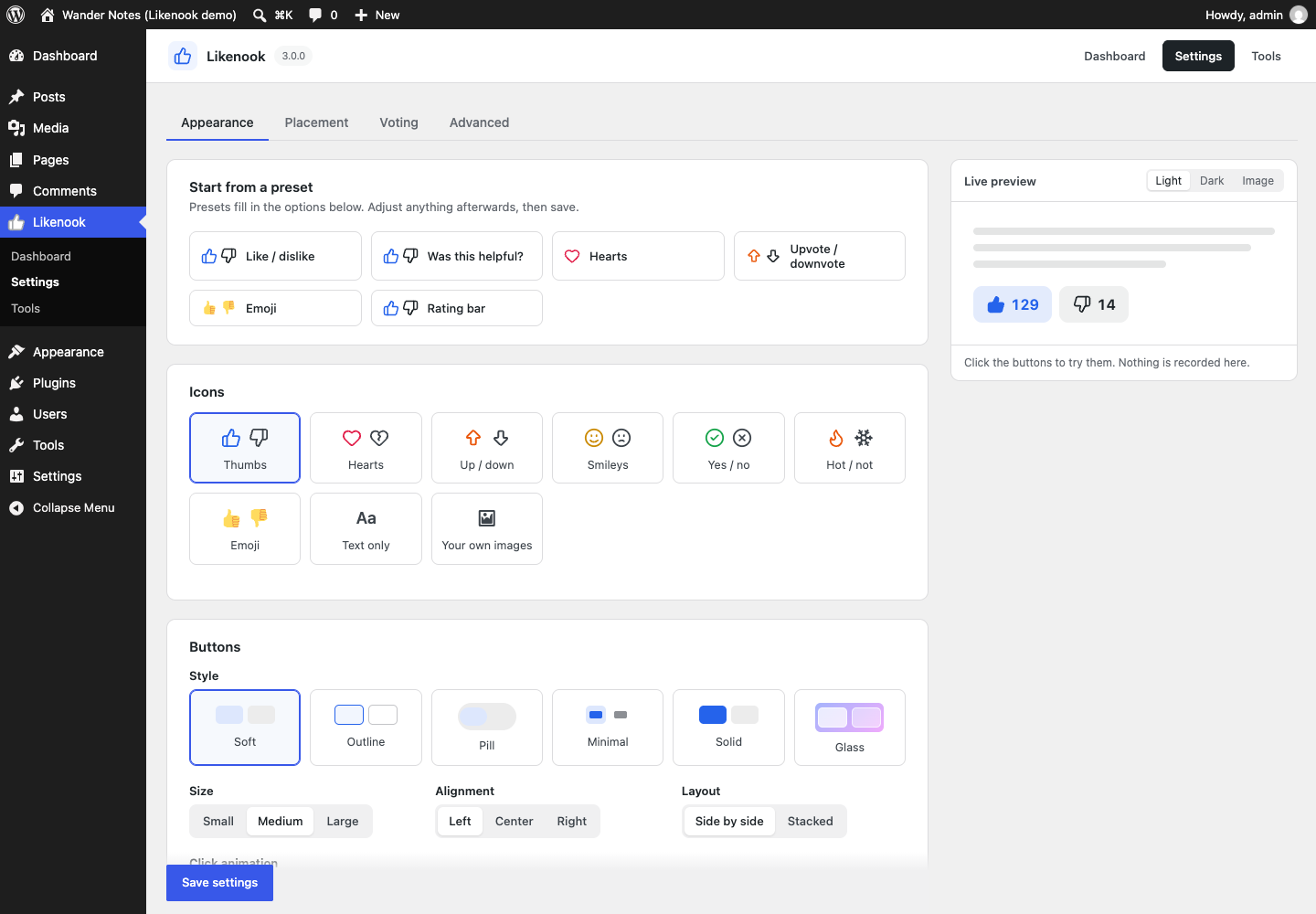
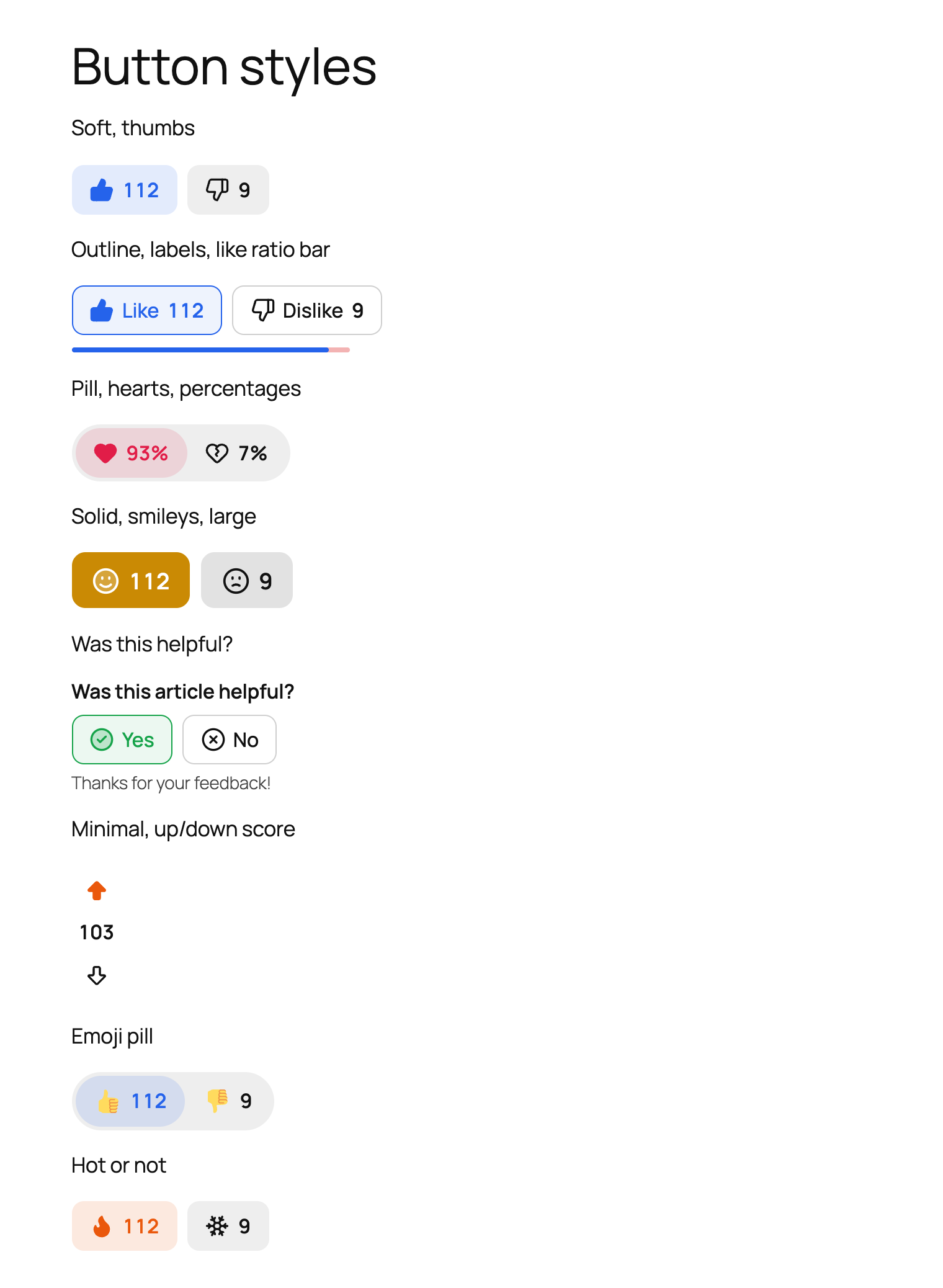
- 9 icon sets: thumbs, hearts, up/down arrows, smileys, yes/no, hot/not, emoji, text only, or your own images.
- 6 ബട്ടൺ ശൈലികൾ: സോഫ്റ്റ്, ഔട്ട്ലൈൻ, പിൽ, മിനിമൽ, സോളിഡ്, ഗ്ലാസ്.
- Sizes, alignment and layout: small, medium or large; left, center or right; side by side or stacked (Reddit-style up/down votes).
- Counts your way: show, hide, show only after voting, percentages, or a single score (likes minus dislikes). Large numbers shorten to 1.2K.
- ലൈക്ക് അനുപാത ബാർ ബട്ടണുകൾക്ക് താഴെ.
- Click animations: pop, bounce or a particle burst. Visitors who prefer reduced motion never see them.
- Presets in one click: Like / dislike, Was this helpful?, Hearts, Upvote / downvote, Emoji and Rating bar.
- തത്സമയ പ്രിവ്യൂ നിങ്ങൾ ക്രമീകരണങ്ങൾ മാറ്റുമ്പോൾ ഇളം, ഇരുണ്ട, ചിത്ര പശ്ചാത്തലങ്ങളിൽ.
- Fits any theme: neutral colours follow your theme’s text colour, so buttons work on light and dark themes without setup. Or pick your own colours.
നിലനിൽക്കുന്ന വോട്ടിംഗ്
- One vote per person. Logged-in users vote with their account; visitors per browser or per IP address.
- People can change their mind or remove their vote (optional).
- Open to everyone, or to logged-in users only, or only to chosen roles. Visitors who can’t vote get a log-in link.
- Works with page caching (WP Rocket, LiteSpeed, Cloudflare and others). Counts and each visitor’s own vote load fresh after the page loads.
- റേറ്റ് ലിമിറ്റിംഗ് സ്ക്രിപ്റ്റ് ചെയ്ത വോട്ട് പ്രളയം തടയുന്നു.
- Cloudflare, പ്രോക്സികൾ എന്നിവയ്ക്ക് പിന്നിലും പ്രവർത്തിക്കുന്നു, സന്ദർശക IP ഹെഡറിനുള്ള ക്രമീകരണത്തോടെ.
സ്ഥാപിക്കൽ
- നിങ്ങൾ തിരഞ്ഞെടുക്കുന്ന പോസ്റ്റ് തരങ്ങളിൽ ഉള്ളടക്കത്തിന് മുമ്പോ ശേഷമോ രണ്ടിടത്തോ സ്വയമേവ.
- ഓരോ അഭിപ്രായത്തിനും താഴെ ചെറിയ ബട്ടണുകൾ.
- WooCommerce ഉൽപ്പന്നങ്ങൾ ഉൽപ്പന്ന സംഗ്രഹത്തിൽ ബട്ടണുകൾ കാണിക്കുന്നു.
- Likenook ബട്ടണുകൾ ബ്ലോക്ക്, വിജറ്റ്, ഷോർട്ട്കോഡ്, Elementor വിജറ്റ്, ഓരോന്നിനും സ്വന്തം ശൈലി ഓപ്ഷനുകൾ.
- ഏറ്റവും കൂടുതൽ ലൈക്ക് ലഭിച്ച പോസ്റ്റുകൾ ബ്ലോക്ക്, വിജറ്റ്, ഷോർട്ട്കോഡ്, Elementor വിജറ്റ്: എല്ലാ സമയവും, അല്ലെങ്കിൽ കഴിഞ്ഞ ആഴ്ച, മാസം അല്ലെങ്കിൽ വർഷം, ഓപ്ഷണൽ ഫീച്ചർ ചെയ്ത ചിത്രങ്ങളോടെ.
- തീമുകൾക്കുള്ള ഒരു ടെംപ്ലേറ്റ് ടാഗ്.
- എഡിറ്ററിൽ നിന്ന് ഏത് ഒറ്റ പോസ്റ്റിലെയും ബട്ടണുകൾ മറയ്ക്കുക.
SEO-യ്ക്കും ഉള്ളടക്ക തന്ത്രത്തിനുമായി നിർമ്മിച്ചത്
ലൈക്കുകൾ വെറുമൊരു പൊങ്ങച്ച സംഖ്യയല്ല. നിങ്ങൾക്കും സെർച്ച് എഞ്ചിനുകൾക്കും ഉപയോഗിക്കാവുന്ന സൂചനകളായി Likenook അവയെ മാറ്റുന്നു.
- Structured data that fits your SEO plugin. Like and dislike counts are added to your page’s schema.org markup as
interactionStatistic(LikeAction and DislikeAction). They join your existing Article or WebPage entity instead of adding a competing one, and work with Yoast SEO, Rank Math, All in One SEO, and themes or plugins that print their own JSON-LD. - Guideline-friendly by design. Counts are only marked up where visitors can see the results, as search engines expect. No star ratings are added, so you stay clear of Google’s rules against self-serving review markup.
- Internal links to your best content. The Most Liked Posts block, widget and shortcode link to the posts readers already love, in your sidebar, after articles or on a “popular” page. That keeps visitors reading and sends internal links where they count.
- Know what to update. Most liked and most disliked posts by week, month or year show which articles earn their place and which need a refresh. On documentation, “Was this helpful?” votes point straight at the pages that leave readers stuck.
- Readable without JavaScript. Buttons and their counts are part of the page HTML, so search engines and AI crawlers see them as they are, and the buttons never pop in after the page loads.
- Fast pages stay fast. About 9 KB of JavaScript with no jQuery, loaded only on pages that show buttons, and full page caching keeps working.
ആക്സസിബിലിറ്റി
- കീബോർഡിൽ പ്രവർത്തിക്കുന്ന, ദൃശ്യമായ ഫോക്കസ് റിംഗുള്ള യഥാർത്ഥ
<button>ഘടകങ്ങൾ. - ഓരോ ബട്ടണും അമർത്തിയിട്ടുണ്ടോ എന്ന് അറിയിക്കുന്നു, വോട്ട് ഫലങ്ങൾ സ്ക്രീൻ റീഡറുകളെ അറിയിക്കുകയും ചെയ്യുന്നു.
- നിങ്ങൾ ലേബലുകൾ കാഴ്ചയിൽ മറച്ചാലും അവ സ്ക്രീൻ റീഡറുകൾക്ക് ലഭ്യമായിരിക്കും.
- ചലനം കുറയ്ക്കാൻ ഇഷ്ടപ്പെടുന്ന സന്ദർശകർക്ക് ആനിമേഷനുകൾ ഓഫാകും.
- സ്ഥിര നിറങ്ങൾ നിങ്ങളുടെ തീമിൻ്റെ ടെക്സ്റ്റ് നിറത്തെ പിന്തുടരുന്നു, അതിനാൽ ഇളം, ഇരുണ്ട തീമുകളിൽ കോൺട്രാസ്റ്റ് നിലനിൽക്കുന്നു.
അനലിറ്റിക്സ്
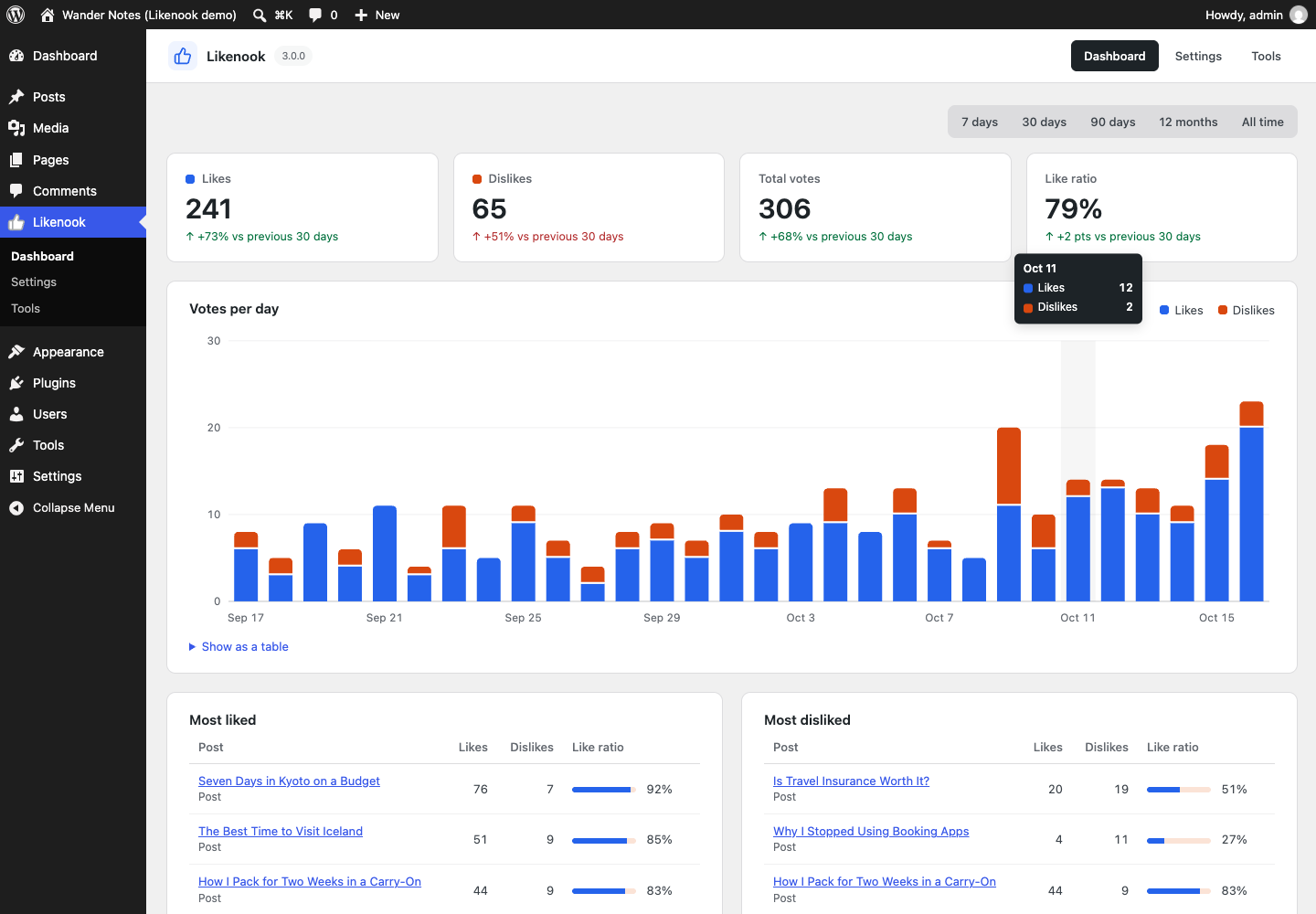
- ലൈക്കുകൾ, ഡിസ്ലൈക്കുകൾ, ആകെ വോട്ടുകൾ, ലൈക്ക് അനുപാതം എന്നിവയുള്ള ഡാഷ്ബോർഡ്, മുൻ കാലയളവുമായി താരതമ്യം ചെയ്തത്.
- പ്രതിദിനം അല്ലെങ്കിൽ പ്രതിമാസ വോട്ടുകളുടെ ചാർട്ട്, പട്ടിക കാഴ്ചയോടൊപ്പം.
- 7, 30 അല്ലെങ്കിൽ 90 ദിവസം, 12 മാസം അല്ലെങ്കിൽ എല്ലാ സമയത്തെയും ഏറ്റവും കൂടുതൽ ലൈക്ക്, ഡിസ്ലൈക്ക് ലഭിച്ച പോസ്റ്റുകൾ.
- പോസ്റ്റ് പട്ടികയിൽ അടുക്കാവുന്ന വോട്ടുകൾ കോളം.
- WordPress ഡാഷ്ബോർഡിൽ “ഈ ആഴ്ചയിലെ ലൈക്കുകൾ” വിജറ്റ്.
- CSV export.
മറ്റൊരു പ്ലഗിനിൽ നിന്ന് മാറുന്നു
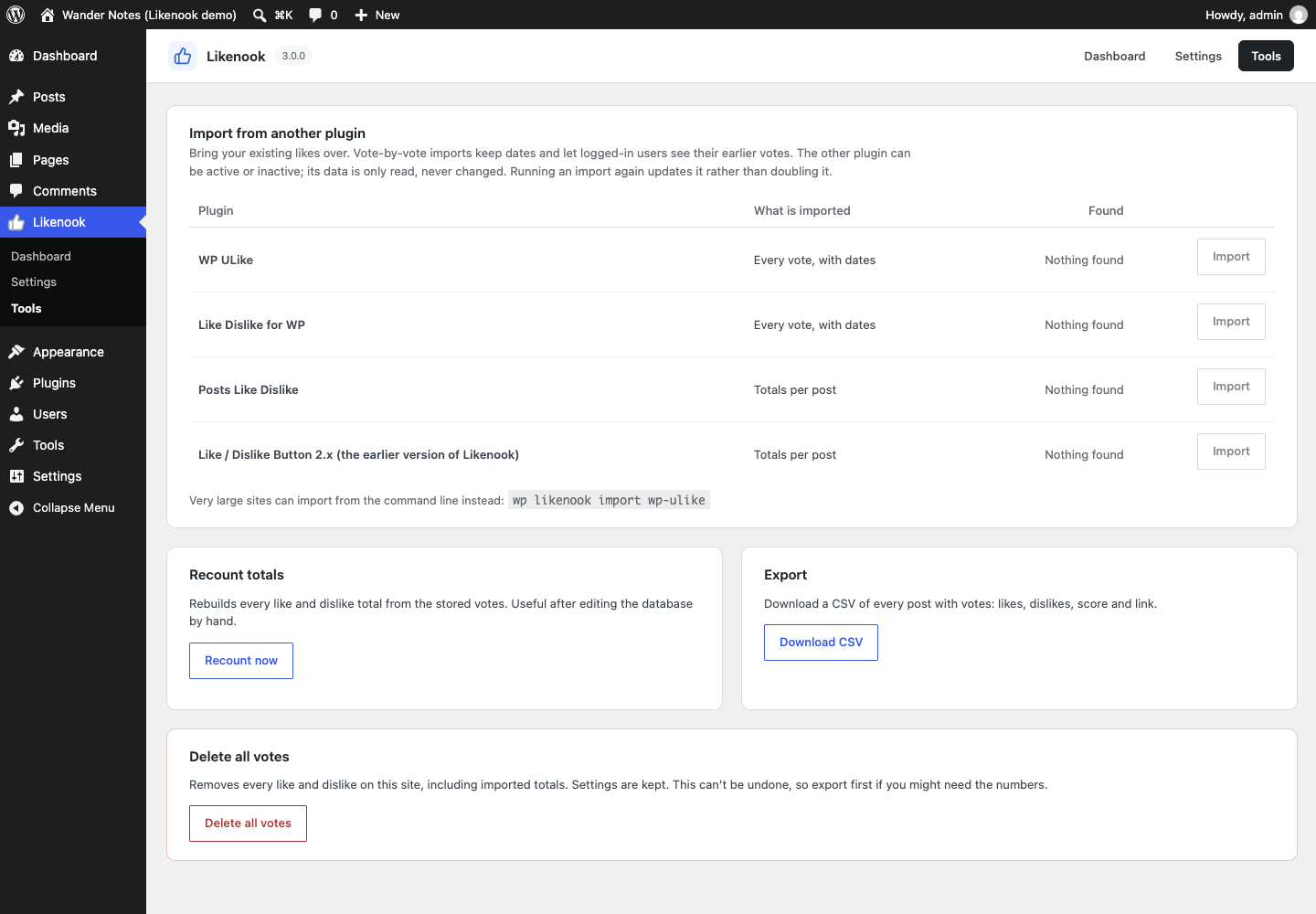
Import your existing votes from WP ULike, Like Dislike for WP and Posts Like Dislike in one click. Individual votes keep their dates, and logged-in users keep their earlier vote. Old shortcodes keep working after the import.
സ്വകാര്യത
- IP വിലാസങ്ങൾ ഒരിക്കലും സംഭരിക്കില്ല, ഒരു കീഡ് വൺ-വേ ഹാഷ് മാത്രം.
- സന്ദർശക കുക്കിയിൽ ഒരു റാൻഡം ഐഡി ഉണ്ട്, ആരെങ്കിലും വോട്ട് ചെയ്ത ശേഷം മാത്രമേ അത് സജ്ജമാക്കൂ.
- WordPress വ്യക്തിഗത ഡാറ്റ കയറ്റുമതി, മായ്ക്കൽ ഉപകരണങ്ങളുമായി പ്രവർത്തിക്കുന്നു.
- നിർദ്ദേശിച്ച സ്വകാര്യതാ നയ വാചകം ഉൾപ്പെടുത്തിയിട്ടുണ്ട്.
- No external requests from your visitors’ browsers, no tracking, no jQuery on the front end. The only outside requests are the optional, admin-only newsletter sign-up and deactivation survey described under External services.
ഡെവലപ്പർമാർക്കായി
- REST API:
GET /wp-json/likenook/v1/state,POST /wp-json/likenook/v1/voteഎന്നിവയും പോസ്റ്റ് എൻഡ്പോയിൻ്റുകളിൽ ഒരുlikenook_votesഫീൽഡും. - ടെംപ്ലേറ്റ് ടാഗുകൾ:
likenook_buttons(),likenook_get_buttons(),likenook_get_counts(). - ആക്ഷൻ:
likenook_vote_recorded. ഫിൽട്ടറുകൾ:likenook_buttons_html,likenook_can_vote,likenook_icon_sets,likenook_visitor_ip,likenook_rate_limit,likenook_schema_statistics,likenook_current_post_id. - WP-CLI:
wp likenook stats,wp likenook recount,wp likenook import <source>,wp likenook reset. --likenook-like,--likenook-dislike,--likenook-radiusപോലുള്ള CSS കസ്റ്റം പ്രോപ്പർട്ടികൾ.
സഹായവും അഭിപ്രായവും
Questions, bug reports and feature ideas are welcome in the support forum. The code is on GitHub if you’d like to contribute.
Likenook is built and maintained by Sanjay Shankar. If it helps your site, a review helps other site owners find it, and you can buy me a coffee to support development.
ക്രെഡിറ്റുകൾ
ഐക്കണുകൾ Lucide-ൽ നിന്ന് സ്വീകരിച്ചതാണ് (ISC ലൈസൻസ്).
ട്രേഡ്മാർക്കുകൾ
WP ULike, Like Dislike for WP, Posts Like Dislike, Yoast SEO, Rank Math, All in One SEO, WooCommerce, Elementor, Divi, Bricks, Beaver Builder, WPBakery, Oxygen, Breakdance, SiteOrigin, Cloudflare and WP Rocket are trademarks of their respective owners. Likenook is an independent plugin and is not affiliated with or endorsed by any of them. These names are used only to describe compatibility and imports.
External services
Used only when an admin chooses to. Visitors never trigger them.
- Newsletter (Brevo): when an admin clicks Subscribe, their email, first name and the plugin name are sent to Brevo. Terms, സ്വകാര്യത
- Deactivation survey (Google Apps Script): when an admin clicks Send & deactivate, the reason, comment, plugin, WordPress, WooCommerce and PHP versions, admin language and, if the contact box is ticked, their name and email are sent to the author’s Google Sheet. Terms, സ്വകാര്യത
Screenshots
ബ്ലോക്കുകൾ
ഈ പ്ലഗിൻ 2 ബ്ലോക്കുകൾ നൽകുന്നു.
- ഏറ്റവും കൂടുതൽ ലൈക്ക് ലഭിച്ച പോസ്റ്റുകൾ എല്ലാ സമയത്തും അല്ലെങ്കിൽ സമീപകാല കാലയളവിലും ഏറ്റവും കൂടുതൽ ലൈക്കുകൾ ലഭിച്ച പോസ്റ്റുകളുടെ ഒരു ലിസ്റ്റ്.
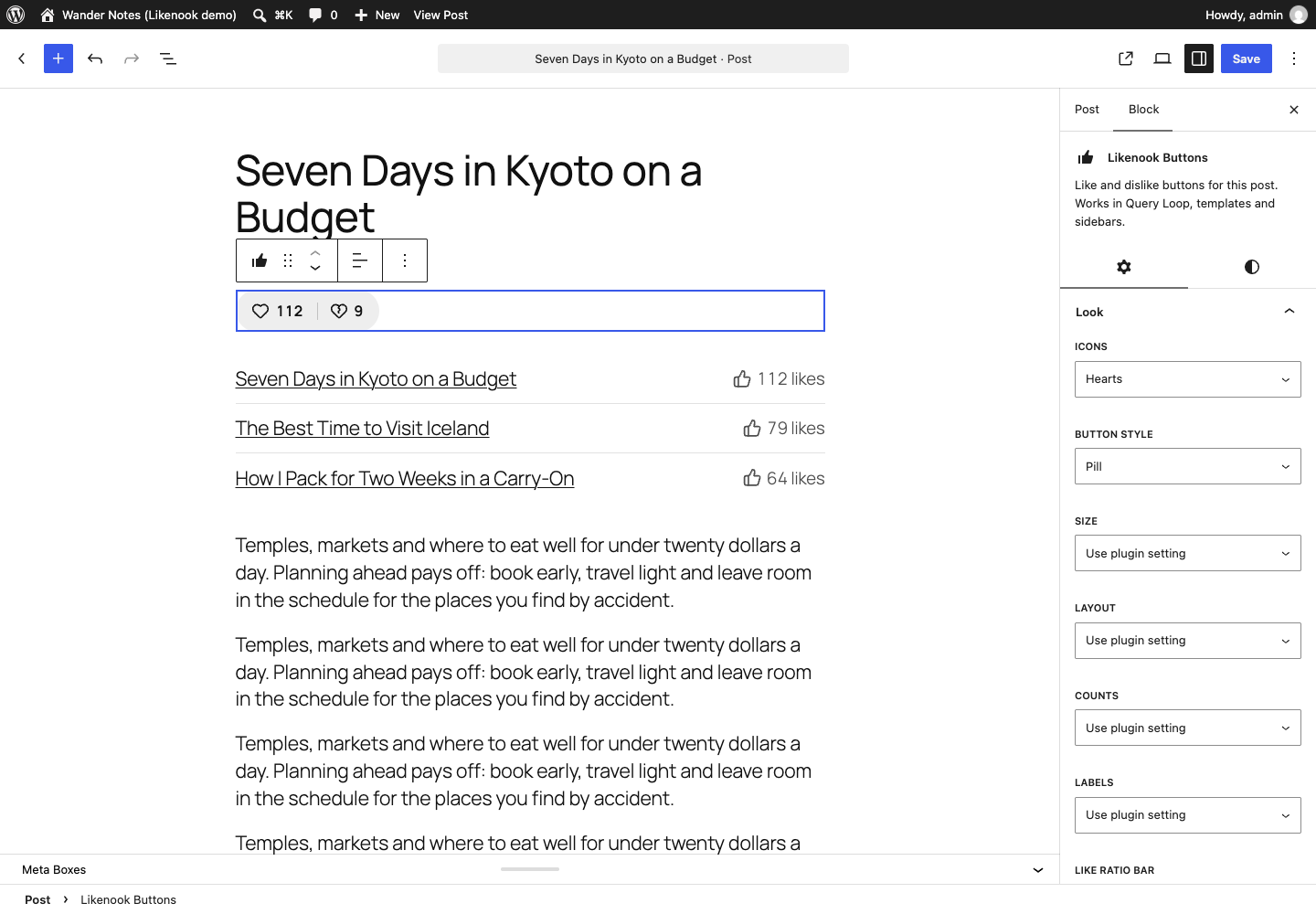
- Likenook ബട്ടണുകൾ ഈ പോസ്റ്റിനുള്ള ലൈക്ക്, ഡിസ്ലൈക്ക് ബട്ടണുകൾ. ക്വറി ലൂപ്പ്, ടെംപ്ലേറ്റുകൾ, സൈഡ്ബാറുകൾ എന്നിവയിൽ പ്രവർത്തിക്കുന്നു.
Installation
- പ്ലഗിനുകൾ പുതിയത് ചേർക്കുക എന്നതിൽ നിന്ന് പ്ലഗിൻ ഇൻസ്റ്റാൾ ചെയ്യുക, അല്ലെങ്കിൽ
likenookഫോൾഡർ/wp-content/plugins/എന്നതിലേക്ക് അപ്ലോഡ് ചെയ്യുക. - ഇത് സജീവമാക്കുക. ബട്ടണുകൾ നിങ്ങളുടെ ബ്ലോഗ് പോസ്റ്റുകൾക്ക് താഴെ ഉടൻ തന്നെ ദൃശ്യമാകും.
- Go to Likenook Settings to choose icons, style and where buttons appear.
FAQ
-
Check that the post type is ticked under Likenook Settings Placement, and that Position isn’t set to “Only where I place them”. Some themes don’t use the standard post content. In that case, add the Likenook Buttons block, the
[likenook]shortcode, or<?php if ( function_exists( 'likenook_buttons' ) ) { likenook_buttons(); } ?>to your template. -
ഇത് Elementor, Divi അല്ലെങ്കിൽ മറ്റ് പേജ് ബിൽഡറുകളിൽ പ്രവർത്തിക്കുമോ?
-
Yes. Elementor has its own Likenook Buttons and Most Liked Posts widgets. In Divi, Bricks, Beaver Builder, WPBakery, Oxygen, Breakdance and other builders, add
[likenook]or[likenook_most_liked]to a shortcode or text module. Buttons placed without an ID belong to the post being viewed. -
Add the Likenook Buttons block to a widget area (or the Likenook Buttons widget in classic themes). It shows the buttons for the post being viewed, and hides itself on blog and archive pages, where there is no single post to vote on. To keep the automatic buttons out of the content at the same time, set Position to “Only where I place them”.
-
Add the Most Liked Posts block or widget to the sidebar, or use
[likenook_most_liked number="5" period="month"]. Choose the post type, the period (all time, 7 days, 30 days or 12 months) and whether to show featured images. -
ഷോർട്ട്കോഡിൽ എനിക്ക് എന്തെല്ലാം സജ്ജമാക്കാം?
-
[likenook] accepts
id,icons(thumbs, hearts, arrows, smileys, checks, flames, emoji, none),style(soft, outline, pill, minimal, solid, glass),size(sm, md, lg),align,layout(row, stack),counts(show, hide, after_vote, percent, score),labels(yes, no),like_label,dislike_label,bar(yes, no),questionandthanks. Anything you leave out uses your settings.[likenook_most_liked] accepts `number`, `post_type`, `period` (all, week, month, year), `show_count` and `show_thumbnail`. -
Yes. Call
<?php if ( function_exists( 'likenook_buttons' ) ) { likenook_buttons(); } ?>in any template file, for example next to the post title or in the author box. Pass a post ID to show the buttons for a different post:likenook_buttons( 42 ). -
ഇത് WooCommerce-ൽ പ്രവർത്തിക്കുമോ?
-
Yes. Tick Products under Placement and the buttons appear in the product summary. The Most Liked Posts block, widget and shortcode can list products too.
-
അക്കൗണ്ട് ഇല്ലാതെ സന്ദർശകർക്ക് വോട്ട് ചെയ്യാമോ?
-
Yes, by default. Each visitor gets one vote per item, recognised by a cookie or by a hashed IP address. To allow only logged-in users, or only certain roles, change “Who can vote” under Voting.
-
ഇത് എൻ്റെ സൈറ്റിനെ മന്ദഗതിയിലാക്കുമോ?
-
No noticeable effect. The front end adds one small stylesheet and about 9 KB of JavaScript (no jQuery), only on pages that show buttons, plus one small request to load live counts. Totals are cached, so lists and sorting never count votes on the fly.
-
ഇത് SEO-യെ സഹായിക്കുമോ?
-
It adds like and dislike counts to your page’s structured data (schema.org
interactionStatistic), alongside the Article markup from your SEO plugin or theme. This describes engagement to search engines and AI crawlers. Counts are only added when visitors can see the results, and you can turn this off under Advanced. It does not create star ratings in search results, and no plugin can promise rankings. -
ഇത് കാഷിംഗ് പ്ലഗിനുകളുമായി പ്രവർത്തിക്കുമോ?
-
Yes. The page can be cached as usual. Counts and the visitor’s own vote load through a small request after the page loads.
-
In block themes, add the Likenook Buttons block inside the Post Template of a Query Loop. In classic themes, turn on “Also show on blog and archive pages” under Placement.
-
ഡോക്യുമെൻ്റേഷനിൽ “ഇത് സഹായകരമായിരുന്നോ?” എന്നതിനായി എനിക്ക് ഇത് ഉപയോഗിക്കാമോ?
-
Yes. Click the “Was this helpful?” preset. It adds the question, Yes / No labels and a thank-you message, and hides the counts.
-
Yes. Under Placement Which buttons, choose “Like only”. The Hearts preset does this too.
-
You chose “Per IP address” tracking, and your office shares one IP. Switch to “Per browser” under Voting.
-
എല്ലാ സന്ദർശകർക്കും ഒരേ IP വിലാസമാണെന്ന് തോന്നുന്നു
-
Your site is probably behind Cloudflare or a proxy. Under Voting, set “Visitor IP comes from” to the matching header.
-
മറ്റൊരു ലൈക്ക് പ്ലഗിനിൽ നിന്ന് എൻ്റെ വോട്ടുകൾ എങ്ങനെ മാറ്റാം?
-
Go to Likenook Tools and click Import next to the plugin. You can run it again safely: it updates rather than doubles. On very large sites, use
wp likenook import wp-ulike. -
Likenook ആക്സസിബിൾ ആണോ?
-
Yes. The buttons are real buttons that work with a keyboard and screen readers, report their pressed state, announce vote results, and respect the reduced motion setting.
-
Yes. Everything uses CSS custom properties, so a few lines change the colours and shape everywhere, for example
.likenook { --likenook-like: #16a34a; --likenook-radius: 4px; }. Each style, size and icon set also adds its own class to the wrapper. -
Likenook വിവർത്തനത്തിന് തയ്യാറാണോ?
-
Yes. All text uses the
likenooktext domain and a translation template is included, so it can be translated on translate.wordpress.org or with a plugin like Loco Translate. -
എനിക്ക് എവിടെ നിന്ന് സഹായം ലഭിക്കും, അല്ലെങ്കിൽ ഒരു സവിശേഷത എങ്ങനെ നിർദ്ദേശിക്കാം?
-
Use the support forum. Feature ideas are very welcome, and you can also open an issue on GitHub.
-
ഞാൻ പ്ലഗിൻ ഇല്ലാതാക്കിയാൽ എൻ്റെ വോട്ടുകൾക്ക് എന്ത് സംഭവിക്കും?
-
They are kept, unless you switch on “Delete all votes and settings when the plugin is deleted” under Advanced first.
Reviews
ഈ പ്ലഗിന് റിവ്യൂകൾ ഒന്നുമില്ല.
Contributors & Developers
“Likenook – ലൈക്ക് ഡിസ്ലൈക്ക് ബട്ടണുകൾ” is open source software. The following people have contributed to this plugin.
Contributors
“Likenook – ലൈക്ക് ഡിസ്ലൈക്ക് ബട്ടണുകൾ” has been translated into 6 locales. Thank you to the translators for their contributions.
Translate “Likenook – ലൈക്ക് ഡിസ്ലൈക്ക് ബട്ടണുകൾ” into your language.
Interested in development?
Browse the code, check out the SVN repository, or subscribe to the development log by RSS.
Changelog
3.0.1
- New: optional newsletter sign-up from the plugin author on the Likenook dashboard and settings. Nothing is sent unless you click Subscribe, and closing the card hides it for 30 days.
- New: optional one-question survey when you deactivate the plugin, to help improve it. Skip & deactivate sends nothing.
- Docs: new External services section in the readme describing both.
3.0.0
- ആദ്യം മുതൽ പുനർനിർമ്മിച്ചു.
- പുതിയത്: 9 ഐക്കൺ സെറ്റുകൾ, 6 ബട്ടൺ ശൈലികൾ, വലിപ്പങ്ങൾ, ലേഔട്ടുകൾ, നിറങ്ങൾ, ക്ലിക്ക് ആനിമേഷനുകൾ, പ്രീസെറ്റുകൾ, തത്സമയ പ്രിവ്യൂവോടെ.
- പുതിയത്: എണ്ണം പ്രദർശന ഓപ്ഷനുകൾ, ചുരുക്ക സംഖ്യകൾ, ലൈക്ക് അനുപാത ബാർ.
- പുതിയത്: “ഇത് സഹായകരമായിരുന്നോ?” ചോദ്യവും നന്ദി സന്ദേശവും.
- പുതിയത്: വോട്ട് മാറ്റുകയോ നീക്കം ചെയ്യുകയോ ചെയ്യുക; ലൈക്ക് മാത്രം, ഡിസ്ലൈക്ക് മാത്രം മോഡുകൾ.
- പുതിയത്: ലോഗിൻ ചെയ്തവർക്ക് മാത്രമുള്ള വോട്ടിംഗ്, റോൾ പരിധികളോടെ; ഓരോ ബ്രൗസറിനും അല്ലെങ്കിൽ ഓരോ IP-ക്കും സന്ദർശക ട്രാക്കിംഗ്; റേറ്റ് ലിമിറ്റിംഗ്.
- പുതിയത്: അഭിപ്രായങ്ങളും WooCommerce ഉൽപ്പന്നങ്ങളും.
- പുതിയത്: Likenook ബട്ടണുകൾ, ഏറ്റവും കൂടുതൽ ലൈക്ക് ലഭിച്ച പോസ്റ്റുകൾ ബ്ലോക്കുകൾ, വിജറ്റുകൾ, ഷോർട്ട്കോഡുകൾ, Elementor വിജറ്റുകൾ. ബ്ലോക്കുകൾ ക്വറി ലൂപ്പ്, ടെംപ്ലേറ്റുകൾ, സൈഡ്ബാറുകൾ എന്നിവയിൽ പ്രവർത്തിക്കുന്നു.
- പുതിയത്: സൈഡ്ബാറുകളിൽ, ബട്ടണുകൾ കാണുന്ന പോസ്റ്റിൻ്റേതാണ്, ബ്ലോഗ്, ആർക്കൈവ് പേജുകളിൽ മറയുന്നു.
- പുതിയത്: ബട്ടൺ ശൈലികൾ തീം ബട്ടൺ CSS-നെ അതിജീവിക്കുന്നു.
- പുതിയത്: അനലിറ്റിക്സ് ഡാഷ്ബോർഡ്, പോസ്റ്റ് പട്ടിക കോളം, ഡാഷ്ബോർഡ് വിജറ്റ്, CSV കയറ്റുമതി.
- പുതിയത്: WP ULike, Like Dislike for WP, Posts Like Dislike എന്നിവയിൽ നിന്ന് ഇറക്കുമതി.
- പുതിയത്: പേജ് കാഷിംഗിൽ പ്രവർത്തിക്കുന്നു.
- പുതിയത്: REST API, WP-CLI കമാൻഡുകൾ, ഹുക്കുകൾ, ടെംപ്ലേറ്റ് ടാഗുകൾ.
- പുതിയത്: ലൈക്ക്, ഡിസ്ലൈക്ക് എണ്ണങ്ങൾ schema.org ഘടനാപരമായ ഡാറ്റയിൽ (interactionStatistic), നിലവിലുള്ള Yoast SEO, Rank Math, All in One SEO അല്ലെങ്കിൽ തീം മാർക്ക്അപ്പിൽ ലയിപ്പിച്ചിരിക്കുന്നു.
- പുതിയത്: വ്യക്തിഗത ഡാറ്റ കയറ്റുമതിയും മായ്ക്കലും, സ്വകാര്യതാ നയ വാചകം.