
Description
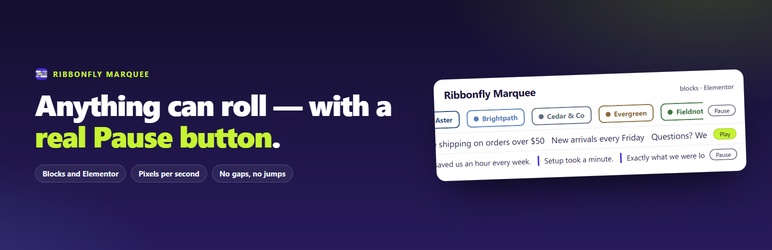
Ribbonfly Marquee makes anything roll in a seamless loop: text, logos, quotes, buttons, or the titles of your latest posts. It works as a block in the block editor and as a widget in Elementor, and both draw through the same engine, so a strip behaves the same in either.
What you get
- A Ribbonfly Marquee block that takes any blocks inside it. The inserter offers three starting points: Text ticker, Logo strip and Testimonials.
- A Ribbonfly News Ticker block and Elementor widget that roll the titles of your latest posts as links: 1 to 20 posts, from one category or from all.
- Elementor widgets with Text, Image and Card items. They need Elementor 3.20 or newer; the blocks do not need Elementor at all.
- Speed in pixels per second, from 10 to 400, so 60 is 60 on a phone and on a wide monitor.
- Four directions: left, right, up and down, with a height of 50 to 1000 pixels for a vertical strip.
- Space between items from 0 to 200 pixels, and an edge fade of 0 to 30 per cent.
Made for visitors who cannot follow moving text
- A Pause button beside every strip, never on top of the text. You choose whether it is always shown or shown on hover and focus; there is no setting that removes it.
- The strip also stops while it is hovered and while anything inside it has keyboard focus.
- For a visitor whose device asks for reduced motion, the strip starts standing still, can be scrolled by hand, and its button says Play.
- The copy that makes the loop is hidden from screen readers and cannot be focused.
- Every strip is a labelled region, and you can change the label.
No gaps, no jumps
- The items repeat until one group is at least as wide as the strip, so there is no empty stretch, however little you put in.
- The strip is measured again when an image has loaded, when fonts are ready and when the strip or an item changes size, and it keeps its place in the loop while it does.
Light on your site
- No jQuery dependency. The script and the style are queued only on pages where a marquee is drawn.
- The plugin stores no settings, and it makes no requests to any outside server.
Ribbonfly Marquee Pro
Ribbonfly Marquee Pro is a separate add-on, sold on the plugin’s own website, that adds two marquees that fill themselves: post cards and WooCommerce products, as blocks and as Elementor widgets. This plugin points to it in three places on its own screens: a tab called Posts & products on Settings Ribbonfly Marquee, one line on that page’s Getting started tab, and a link on the plugin’s row on the Plugins screen. Everything in this plugin stays free; nothing is locked.
External services
This plugin does not connect to any external service. It makes no requests to any outside server, and it loads no script, style sheet or font from one.
Screenshots


ബ്ലോക്കുകൾ
ഈ പ്ലഗിൻ 2 ബ്ലോക്കുകൾ നൽകുന്നു.
- Ribbonfly News Ticker The titles of your latest posts, rolling by as links.
- Ribbonfly Marquee Anything you put inside rolls in a seamless loop, with a pause button.
Installation
- In your WordPress admin, go to Plugins Add New, search for Ribbonfly Marquee, then press Install and Activate.
- In the block editor, press + and search for “ribbonfly”. Pick Text ticker, Logo strip, Testimonials or Ribbonfly News Ticker.
- In Elementor, open the Ribbonfly Marquee category in the widget panel and drag in Ribbonfly Marquee or Ribbonfly News Ticker.
- Settings Ribbonfly Marquee has a short guide and a live marquee you can pause. There is nothing to configure.
FAQ
-
Do I need Elementor?
-
No. The blocks work on their own in the block editor. The Elementor widgets appear when Elementor 3.20 or newer is active; on an older Elementor the plugin says so on the Plugins screen and on its own settings page, and the blocks keep working.
-
Can a visitor stop the movement?
-
Yes. Every strip has a Pause button, and it also stops while hovered or while something inside it has keyboard focus. A visitor whose device asks for reduced motion gets a strip that starts still and can be scrolled by hand.
-
Does it slow my site down?
-
Pages without a marquee are not touched: the script and the style are queued only where a marquee is drawn. The script does not depend on jQuery.
-
Is there a shortcode?
-
No. The plugin is for the block editor, the Site Editor and Elementor. In a block theme you can put the block in a template part such as the header.
-
Which posts does the news ticker show?
-
Published posts only, newest first, optionally from one category. Drafts, private posts and password-protected posts never appear.
-
Does it work on a right-to-left site?
-
The plugin marks the strip as right-to-left and lays the items out right to left inside each group. The direction of the motion is not changed for you; you choose it.
-
What does the plugin send out?
-
Nothing. It makes no requests to any outside server.
Reviews
ഈ പ്ലഗിന് റിവ്യൂകൾ ഒന്നുമില്ല.
Contributors & Developers
“Ribbonfly Marquee – News Ticker & Logo Ticker” is open source software. The following people have contributed to this plugin.
Contributors
Translate “Ribbonfly Marquee – News Ticker & Logo Ticker” into your language.
Interested in development?
Browse the code, check out the SVN repository, or subscribe to the development log by RSS.
Changelog
1.0.0
- First release.